People prefer to watch clips they can relate to, that have short runtimes, rather than long videos. Likewise, social media makers are seeking ways to create and publish more content without getting burned out, while also experimenting with new styles.
Many new creators aren't able to create interesting videos because they don’t know how to edit or do not have time to learn the complicated software. In this article, we’ll discuss Clipfly AI in detail, explore its pros and cons, and how you can use it. We will also suggest an easier alternative for users to try.
Part 1. What is Clipfly AI?
It is an online AI video creation tool designed to help beginners and busy creators to create clips. Clipfly.AI converts ideas or images into short, engaging clips within a couple of minutes. You don’t have to install any heavy software on your device, as this tool runs in your browser.
Unlike other tools, it offers a wide variety of AI templates and filters, and it supports text input in many languages. Clipfly AI serves as an idea solution for those who want to create clips within minutes.
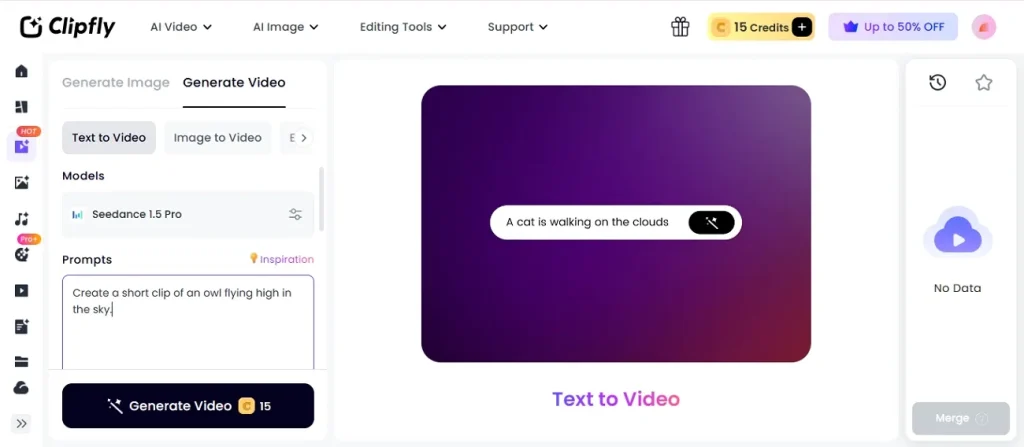
Key Features of Clipfly AI
- Provides niche generators for ASMR videos, old photo animation, AI tattoos, AI girls, and meme videos.
- Integrates AI models such as Seedance, Veo 3, and Wan 2.5 for different styles.
- The tool offers a diverse range of AI templates and filters suitable for social media.
- Users can adjust motion, audio levels, and aspect ratios, then export quickly without watermarks.
How Clipfly AI Works?
Creating videos becomes much easier once you understand how the Clipfly AI video generator operates. You can get ready-to-post clips by carefully reviewing the steps below.
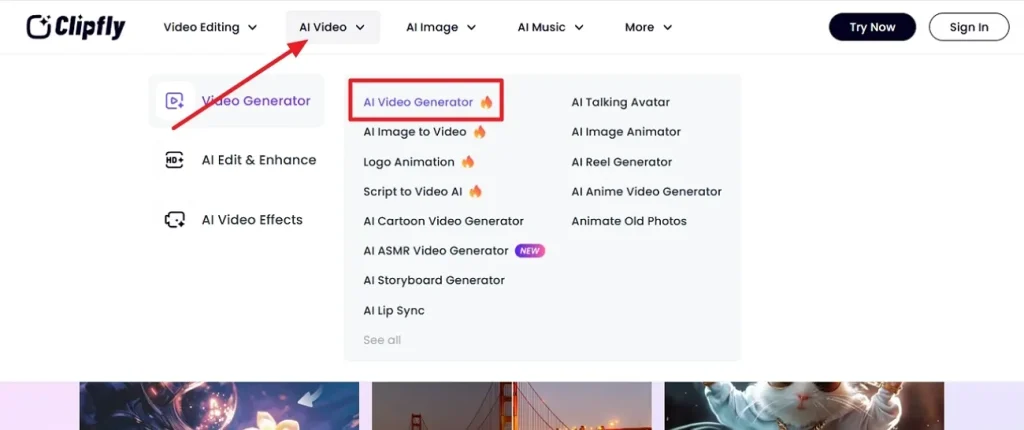
Step 1. Begin by going to the official website and click on the AI Video section. Select the AI Video Generator button from the dropdown menu that opens. A new interface appears where you will need to click the Generate option.
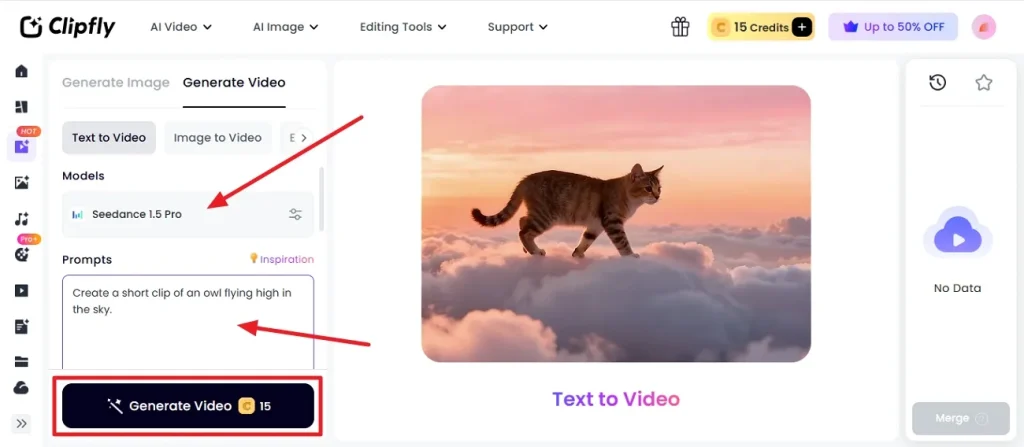
Step 2. Here, a new interface opens, and you select your preferred AI model from the Models option. Then, type your idea into the prompt box and click on the Generate Video button.
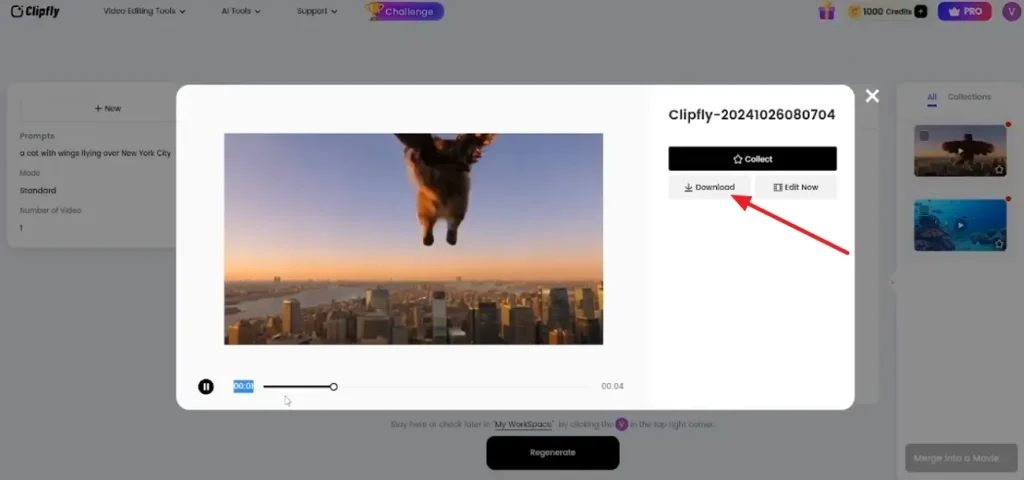
Step 3. Now review your video once through and determine if there are any changes that need to be made. Once no more revisions are required, select the Download option and save your video on your device.
Is ClipFly AI Free?
Like many AI video applications, Clipfly AI has a free plan for testing out its base features, and paid plans provide more tools and functionality. Upon signup, users get 15 free credits to explore the tool and what it offers.
The Pro plan is about $49.99 per year with 200 credits per month, and the Pro+ plan is $189.99/annually with 1000 credits. Users who select the Business Plan will pay $379.99 for a yearly subscription and receive 3000 credits, which gives them full access to models and additional storage.
Pros and Cons of Clipfly AI to Know
Evaluating the strengths and weaknesses helps you decide whether Clipfly matches your content goals and workflow. In the section below, we have compiled a list of the pros and cons of the tool:
Pros
- Multiple AI models and style templates for varied creative directions.
- Fast text‑to‑video and image‑to‑video generators for creating short and engaging clips.
- Contains a simple, beginner‑friendly interface with a very low learning curve.
- A large asset library with audio, stickers, and images included in plans.
Cons
- Offers limited granular control when compared with advanced timeline video editors.
- Free tier and credits can feel restrictive for heavy daily usage.
- The video quality can vary, especially with complex or unclear prompts.
- Browser‑based workflow may lag or stutter on slower devices or networks.
Part 2. Why Magiclight AI Performs Better Than Clipfly AI
After going through the specifics of Clipfly.AI, some creators might still feel a bit hesitant. There is no doubt that the tool lacks certain features needed for deeper storytelling. In this case, users can turn to Magiclight AI, an all-in-one AI video platform ideal for beginners. It offers specialized presets for kids’ tales, music videos, explainers, character vlogs, and religious stories.
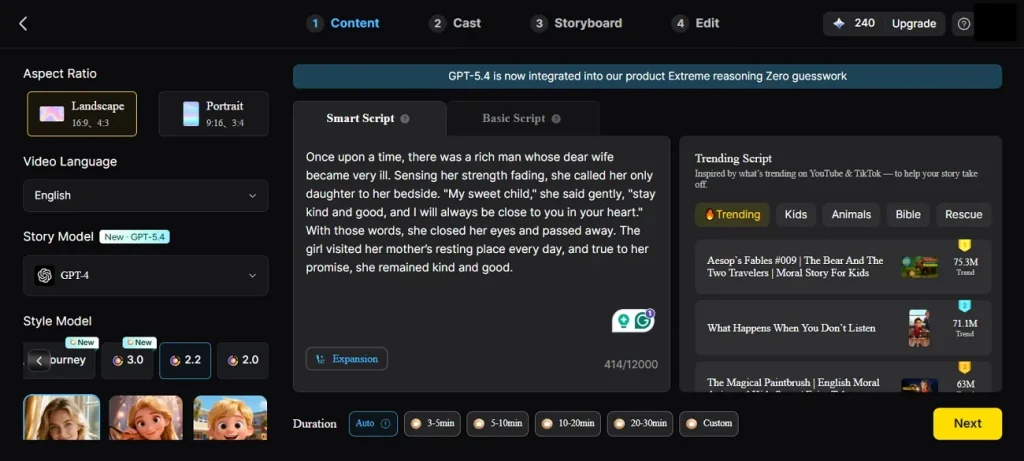
Magiclight AI supports scripts up to 12,000 characters for cinematic narratives. The software keeps character designs consistent across scenes, enhancing visual continuity and long‑form storytelling cohesion. With a wide range of AI models and easy prompt-based editing, this tool is a better option for both busy creators and newbies.
Key Features
- Multilingual Voices: Offers 37 voiceover options and cloning for characters in 11 languages.
- Different Models and Styles: Provides 18+ AI models and 20+ visual styles for creating clips.
- Precise Scene Control: Alter poses and expressions with Nano until every shot looks perfect.
- Multiple Inputs: Magiclight AI allows users to input text, images, and audio for video creation.
How to Create Story Clips with Magiclight AI
In Magiclight AI, users get an easy story-to-video workflow with detailed scene and character refinement. To learn how to use Magiclight AI, review the steps given below:
Step 1. Access the Story to Video Tool
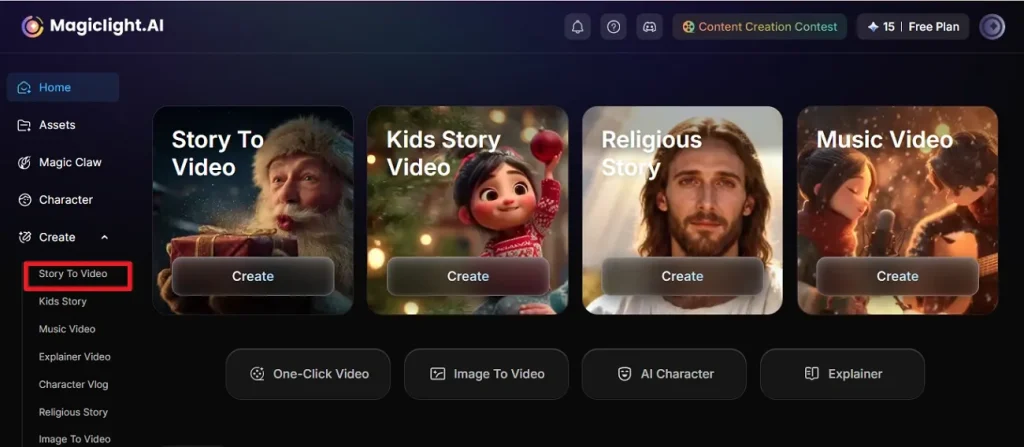
Firstly, open Magiclight AI on your device and click on the Story to Video option. This allows you to start a new video project in the tool.
Step 2. Input Prompt and Video Settings
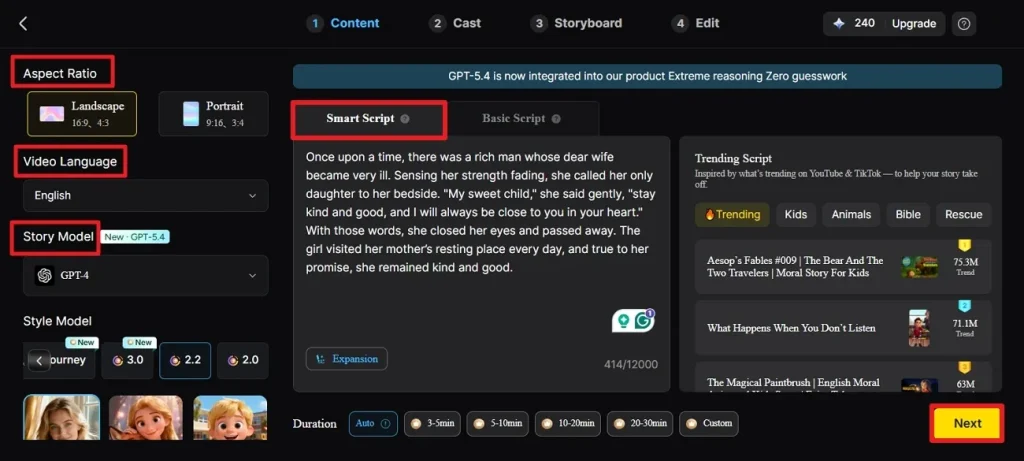
Next, write a text prompt in the Smart Script section of the interface. Now, pick your desired Language, Aspect Ratio, and Story Model, then click Next.
Step 3. Edit or Delete Generated Scenes
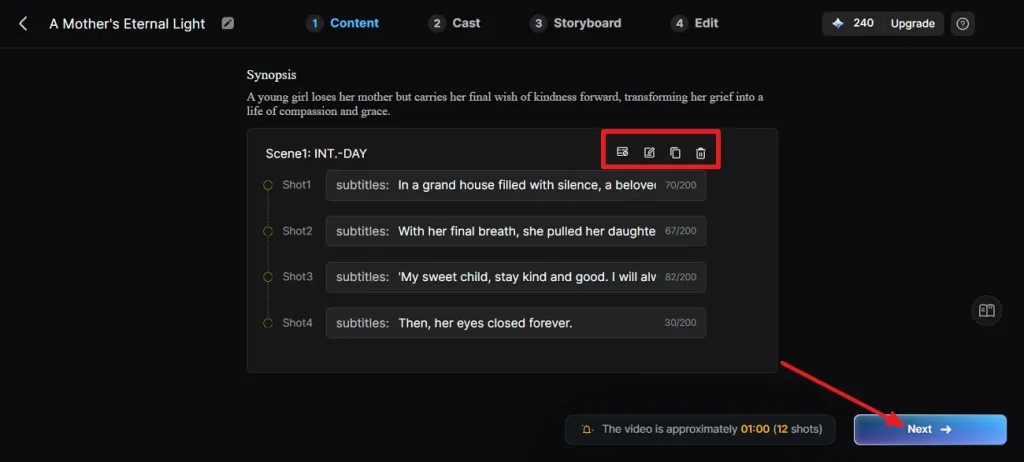
The tool will automatically generate shots from your script at this stage. Edit or delete a scene by clicking on the icons at the top of each scene, and then click the Next button.
Step 4. Modify Characters and Voices
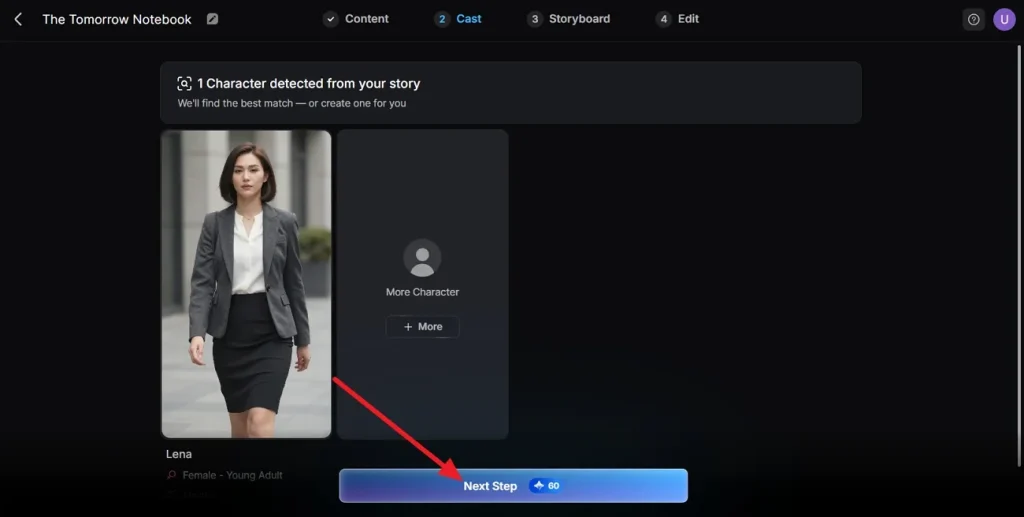
Here, click a character and modify its voice by adjusting options such as age, gender, and style. Click the Next Step option after finalizing each character’s voice style.
Step 5. Adjust Storyboard Scenes
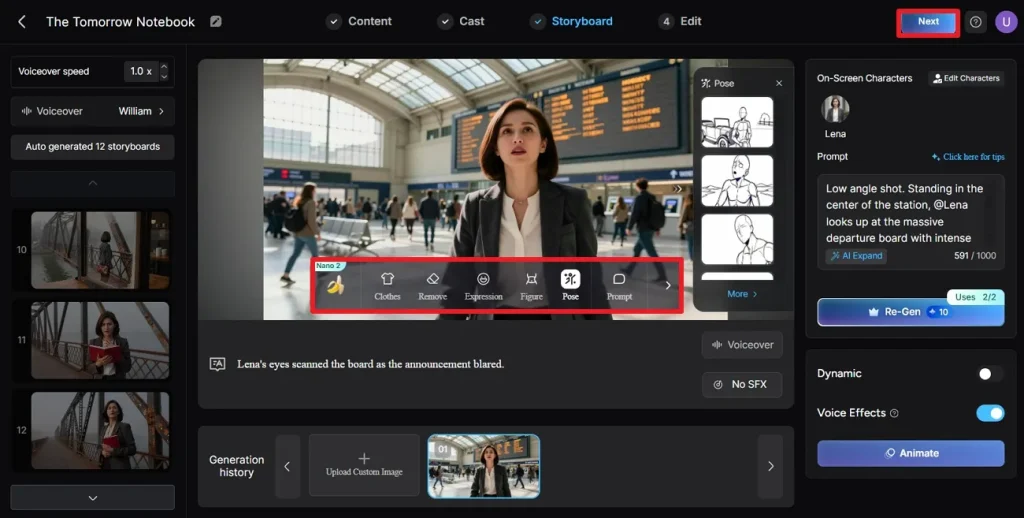
You will then be routed to the Storyboard tab, where you can adjust the Clothes, Expression, and Pose in each scene. This is done by clicking on the icons at the bottom of the video screen and then clicking on the Next button.
Step 6. Review, Edit, and Export the Clip
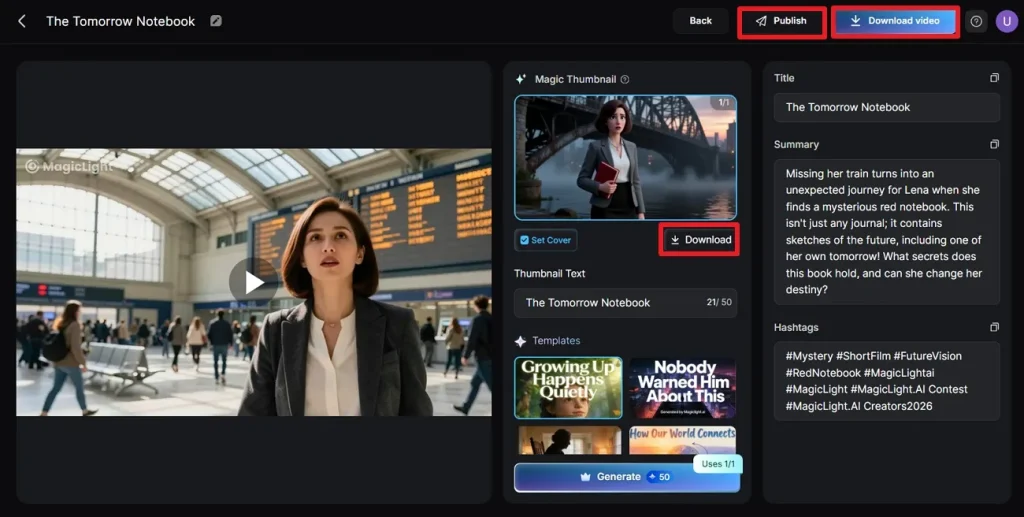
Finally, preview the final video and click on the Download button to separately export the magic thumbnail. If everything looks perfect, press the Download Video option or the Publish option to share your video with others.
Comparison Table Between Clipfly AI and Magiclight AI
In this section, let us look into the differences between Clipfly and Magiclight AI. The table below tabulates both tools and their features side-by-side:
| Aspect | Clipfly AI | Magiclight AI |
| Primary Focus | Short-form social clips and promos | Full storytelling pipeline |
| Maximum Video Duration | Short clips (4-8 seconds) | Both short and long videos (10 seconds-50 minutes) |
| Object-Level Refinements | Not offered in this tool | Nano helps in detailed scene revisions |
| Templates and AI models | Offers a diverse range of templates and AI models | Provides 7 themed templates and 18+ AI video models (Gemini Omni and Seedance 2.0) |
| Multilingual Support | 14 languages such as French, Italian, Portuguese, and Japanese | 11 languages, including Korean, Mandarin, Hindi, Dutch, etc. |
| Free and Paid Plans | Get 15 credits on sign up and paid plans start from $50 annually | 300 free credits and plans start from $72 annually |
Conclusion
In a nutshell, creators use AI tools to transform ideas into engaging videos on social media. You can use Clipfly AI video generator to produce short video clips effortlessly, play with styles, and test various templates. But if you're looking for consistent characters and precise creative control, Magiclight AI is the better choice.
Frequently Asked Questions on Clipfly AI
Q1. Can Clipfly AI generate images?
Yes. The Clipfly AI image generator produces images from text or photos. You can then reuse those images inside videos or download them directly, depending on your goal.
Q2. Does Clipfly AI support Ghibli-style AI art?
Yes, Clipfly AI supports Ghibli‑style art through its anime and Ghibli generators. Users can easily apply Studio Ghibli‑inspired styles to both images and short AI videos to make engaging clips. Magiclight AI also provides Ghibli-style videos as one of its visual styles.
Q3. What are the limitations of the Clipfly AI free plan?
On signup, users get 15 free credits when they use Clipfly. The free plan limits credits, advanced models, and sometimes output resolution. Creators will need paid tiers, while Magiclight AI offers more generous options and free credits.
Q4. What are the best Clipfly AI alternatives?
Good Clipfly AI alternatives include Magiclight AI, which gives you long, scripted stories and cinematic control. Other tools focus on template‑based short videos, but Magiclight stands out for 50‑minute narrative projects.
Q5. Can Clipfly AI create content for TikTok and YouTube Shorts?
TikTok and YouTube Shorts can easily be created in Clipfly. It offers aspect‑ratio presets, templates, and fast exports tailored for Reels‑style short‑form platforms.


![How to Make a Product Video for Marketing With AI [Guide 2026]](https://magiclight.ai/wp-2/wp-content/uploads/product-video-marketing-guide-1-300x198.webp)