



Free AI tools help creators make videos, images, designs, scripts, and other digital content. Many tools offer free access, allowing creators to begin projects without paying any money. However, free plans often include limits on usage, exports, features, or available AI credits.
Some platforms may also add watermarks or make generated content publicly available by default. Understanding these limits helps creators choose suitable tools for different projects and content needs. This guide compares 7 AI tools to help creators find the right option for their daily use.
Part 1. What to Check Before Choosing Free AI Tools
Free artificial intelligence tools offer different features, limits, and options for various creative projects. Below are the important things to check before choosing a free tool for creation.
- Usage Limits: Review daily or monthly AI limits and confirm when unused credits expire automatically.
- Export Quality: Check whether free plans add watermarks or restrict video exports to lower resolutions.
- Ownership and Rights: See if the platform lets you use AI content for personal and commercial projects.
- Privacy: Check where your work goes after you create it when using a free plan.
- Upgrade Cost: Compare the first paid plan to understand future costs when free limits become restrictive.
Part 2. 7 Best Free AI Tools to Try
Creators can handle video creation, image generation, and writing using free artificial intelligence app options. Some tools work better for certain projects, so check what each free plan actually gives you.
1. MagicLight AI
Best For: Creators making complete animated videos from written ideas.
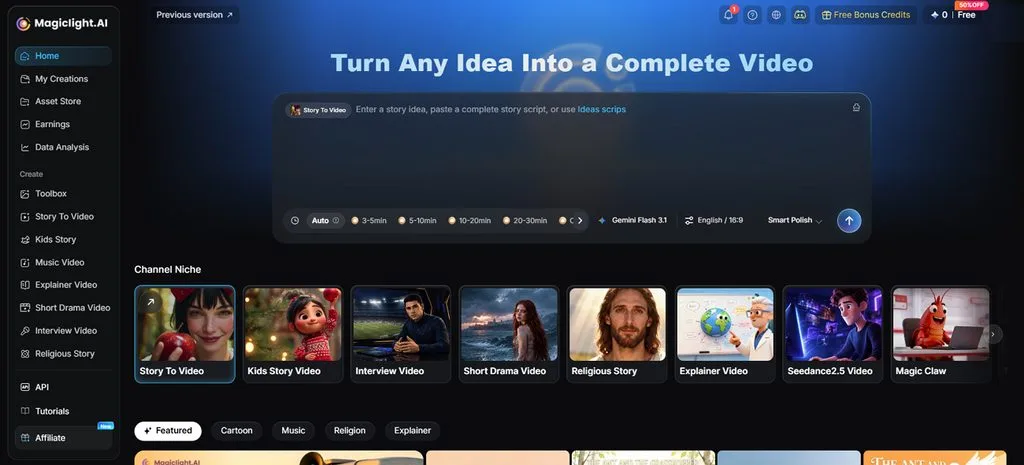
Creators can use MagicLight AI to turn written ideas into complete videos with less effort. The platform supports story videos, image creation, narration, captions, and other useful content creation tasks. A written script can become an animated video with matching characters, voices, scenes, and captions.
New users receive free credits, so they can explore the platform without entering card details. These credits can be used for video creation, image generation, and Image to Video features. This makes MagicLight AI useful for creators who want several creative tools in one platform.
Key Features
- MagicLight Agent: Share your concept, and the agent maps out the whole video process. Scripts, storyboards, characters, and visual choices are prepared before generation even begins.
- Long-Form Stories: Add scripts reaching 12,000 characters when producing longer stories with detailed scenes. Finished videos can run for 50 minutes, giving longer ideas enough screen time.
- AI Character Generator: Describe a character using up to 1,000 characters to shape its appearance. Reference images can guide the design, while saved characters remain ready for reuse.
- AI Image Generation: Pick among 5 image models depending on the visuals your project requires. Write prompts within 500 characters and add reference files sized up to 20MB.
- Voices and Captions: Narration comes with 37 AI voices, giving different options for each project. Viewers can follow without audio using any of the 16 available caption styles.
Pros
- Creates complete long videos without assembling multiple clips.
- Works across web, iOS, and Android using one account.
- Adjust clothes, poses, and expressions before final video rendering.
Con
- Does not offer output resolution greater than 1080p.
2. Canva
Best For: Quick social content creators working from customizable templates.
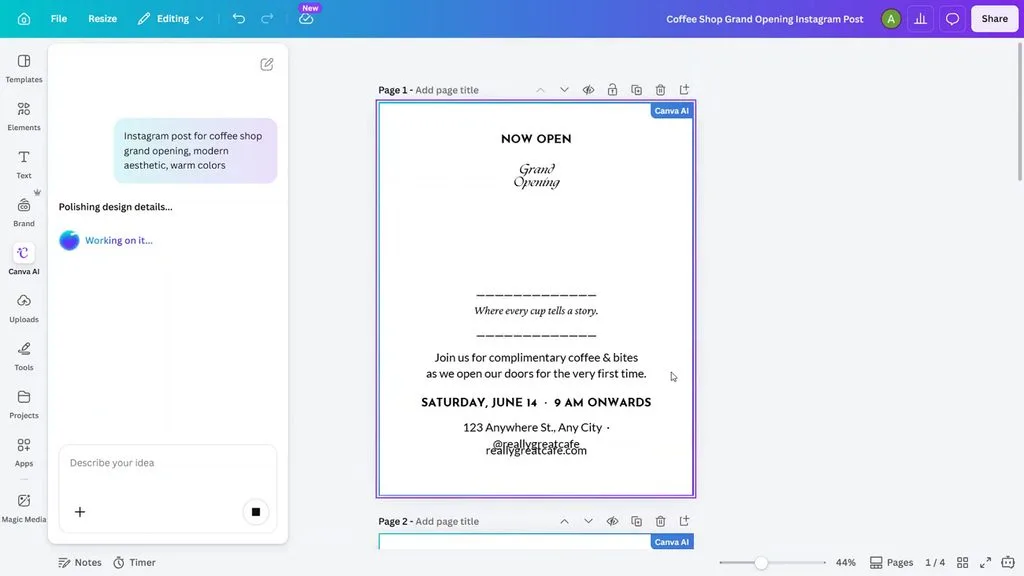
Social media creators can build polished graphics, presentations, and videos without advanced design experience using Canva. A free AI platform brings writing, image generation, and editable design tools into one workspace. Templates make starting easier, while AI controls help reshape content without rebuilding projects manually.
Key Features
- Magic Write can draft, summarize, expand, or rewrite text within existing Canva designs.
- Magic Layers converts flat images into separate editable objects while preserving original layouts.
- Canva AI creates custom images from written prompts directly within the design editor.
Pros
- Free users get templates, graphics, images, and storage.
- Magic Write works across documents, presentations, and designs.
Cons
- Advanced Canva AI workflows remain unavailable on Free.
- Monthly AI allowances restrict repeated generation for projects.
3. CapCut
Best For: Short video editors needing fast captions and cleanup.
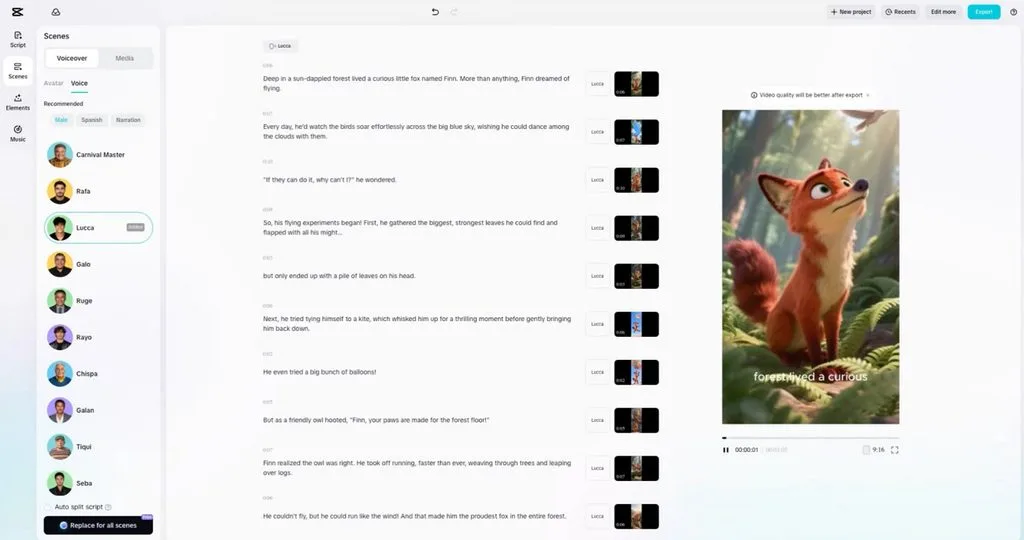
Short video creators can quickly improve speech, captions, and other important editing details. Among free artificial intelligence tools, CapCut puts strong focus on quick video editing workflows. Its desktop and browser editors combine practical AI controls with familiar timeline editing tools.
Key Features
- Auto Captions converts spoken dialogue into editable subtitles for faster video editing.
- Voice Enhancer removes background noise, reduces echo, and improves spoken audio clarity.
- Background Remover separates people from video scenes without requiring any green screen.
Pros
- Voice enhancement adjusts strength from 0% through 100%.
- Text-to-speech supports narration without requiring separate recording equipment.
Cons
- Premium effects and templates remain locked behind Pro.
- Repeated AI editing can quickly exhaust free allowances.
4. Adobe Express
Best For: Adobe users creating branded graphics and social content.
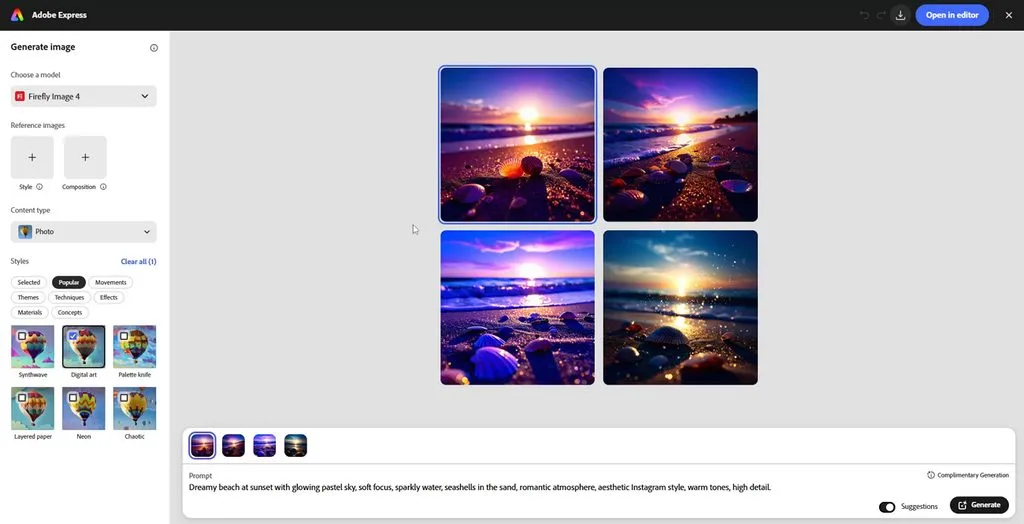
Adobe Express helps creators make social graphics, videos, and branded content with Firefly features. This free AI software combines familiar design controls with image generation and editing features. Photoshop and Illustrator users can move creative assets into Express for quicker everyday content creation.
Key Features
- Turn written prompts into custom Firefly visuals directly within your Adobe Express project.
- Add, remove, or replace objects in images using text prompts within Adobe Express.
- Create Text Effects applies custom textures and decorative styles to words using prompts.
Pros
- Firefly models support commercially usable content for creative projects.
- Background removal quickly isolates subjects without manual selection work.
Cons
- Free users receive limited access to premium generative features.
- Generative video access remains restricted compared with image tools.
5. VEED
Best For: Social teams turning recordings into captioned short videos.
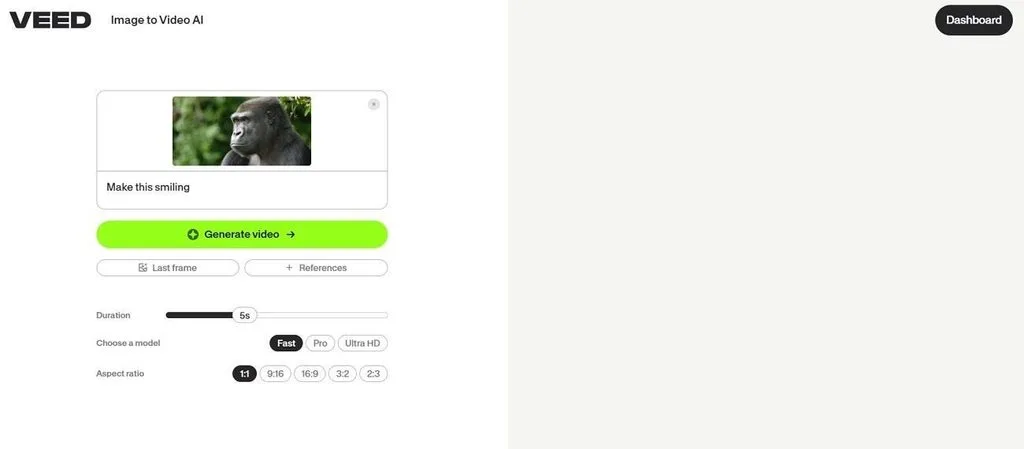
This AI tool keeps video editing inside the browser, helping creators finish social content without downloads. For creators needing a free artificial intelligence app, its tools simplify repetitive editing work. The editor handles subtitles, speech generation, clip resizing, and social content from one workspace.
Key Features
- Auto Subtitles turns spoken audio into editable captions with customizable subtitle styling.
- OpenEdit follows written editing instructions to change footage through an AI agent.
- Clips finds useful moments in longer recordings and creates shorter social-ready video segments.
Pros
- Browser editing removes the need for desktop software installation.
- Automatic subtitles reduce manual transcription work for spoken videos.
Cons
- Free exports include watermarks and remain limited to 720p.
- AI avatar creation requires credits unavailable with most free accounts.
6. Leonardo AI
Best For: Concept artists testing fresh visual ideas every day.
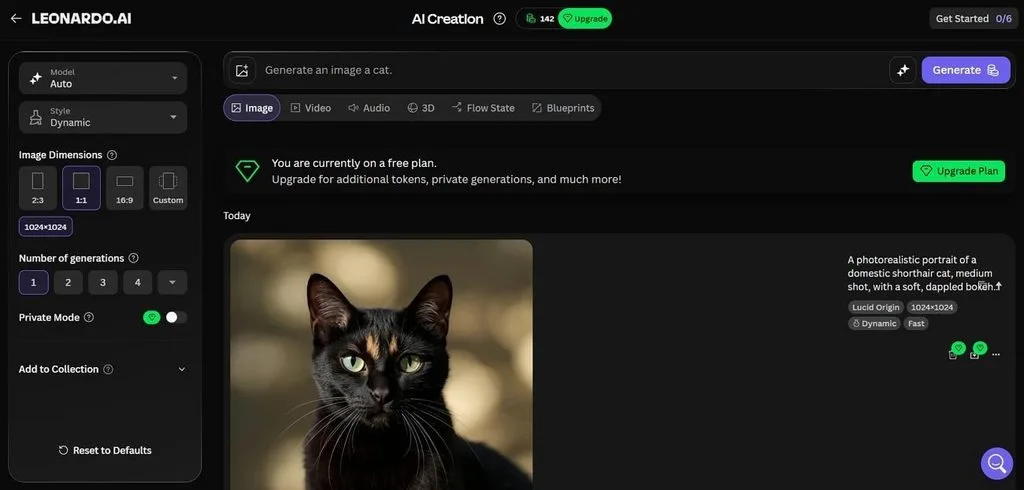
Visual creators use Leonardo AI to explore artwork, thumbnails, concepts, and motion from prompts. For artificial intelligence software free options, it provides 150 tokens every single day. Its creative workspace suits frequent visual experiments without requiring separate image and video creation programs.
Key Features
- Flow State continuously produces image variations from prompts for faster visual idea exploration.
- Realtime Canvas transforms rough drawings while users sketch and adjust their visual concepts.
- Motion 2.0 brings generated still images to life through short animated video sequences.
Pros
- Free users receive 150 fast tokens each day.
- Third-party models remain available alongside Leonardo platform models.
Cons
- Free creations remain public instead of staying private.
- Daily tokens cannot roll into a token bank.
7. ChatGPT
Best For: Writers developing scripts, research, outlines, and early concepts.
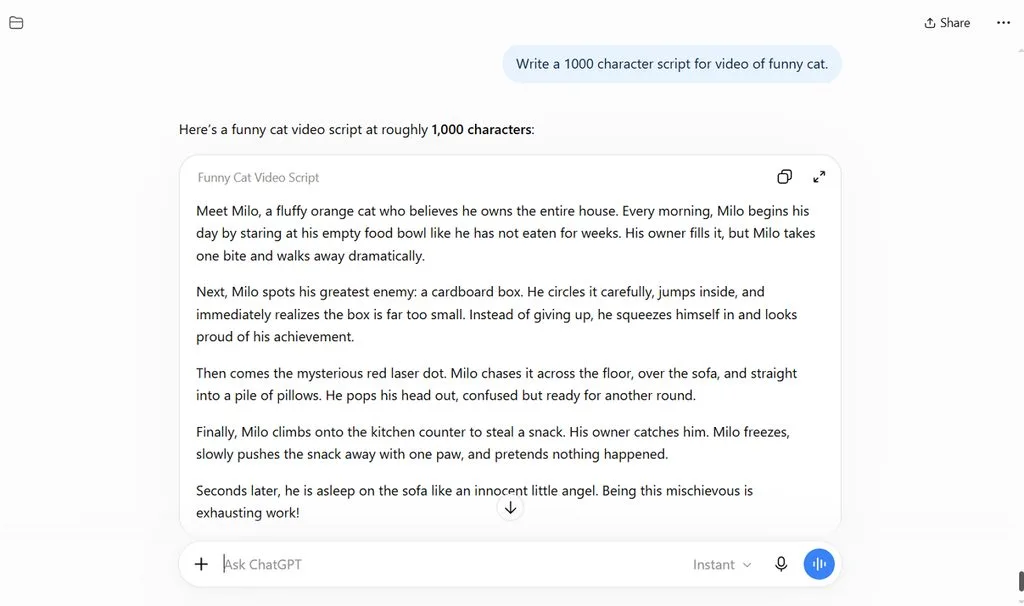
Writers often begin with ChatGPT when scripts, outlines, research, or fresh ideas need developing first. Using this AI tool for free provides GPT-5.6 Luna for everyday text conversations. ChatGPT also connects writing work with web search, file analysis, images, and spoken conversations.
Key Features
- Think gives GPT-5.6 Luna more reasoning time when questions require deeper consideration.
- Image creation turns conversational instructions into original visuals without requiring separate design software.
- Data analysis examines uploaded spreadsheets and files to uncover useful patterns and insights.
Pros
- Everyday text conversations have unlimited access for free.
- Web search brings current information directly into conversations.
Cons
- Image generation and data analysis have separate limits.
- File uploads, image generation, voice, and data analysis have separate usage limits.
Compare All Free AI Tools
Different free AI tools offer different features, limits, and options for creative work. Your best choice depends on what you create and which limits affect projects. The table below compares each option to help you understand their main differences:
| Tool | Free Allowance | Key Free Limit |
| MagicLight AI | Free entry credits, no card required | 1080p watermark-free exports require a paid plan |
| Canva | Up to 20 AI uses monthly | AI usage varies by feature and model |
| CapCut | Core editing and selected AI tools | Some advanced AI tools and assets require Pro |
| Adobe Express | Daily Firefly generations | AI video limited to 2 lifetime 5-second generations |
| VEED | Basic editing and selected AI trials | Free exports are 720p with a watermark |
| Leonardo AI | 150 Fast Tokens daily | Free creations are public and tokens expire daily |
| ChatGPT | Unlimited GPT-5.6 Luna text chats | Images, files, voice, and tools have separate limits |
Part 3. Why Choose MagicLight AI for Free AI Content Creation
Many free tools handle only one task, making complete video creation harder for creators. People exploring artificial intelligence software free options often need several tools for one project. Below are the main reasons MagicLight AI makes free content creation easier for creators.
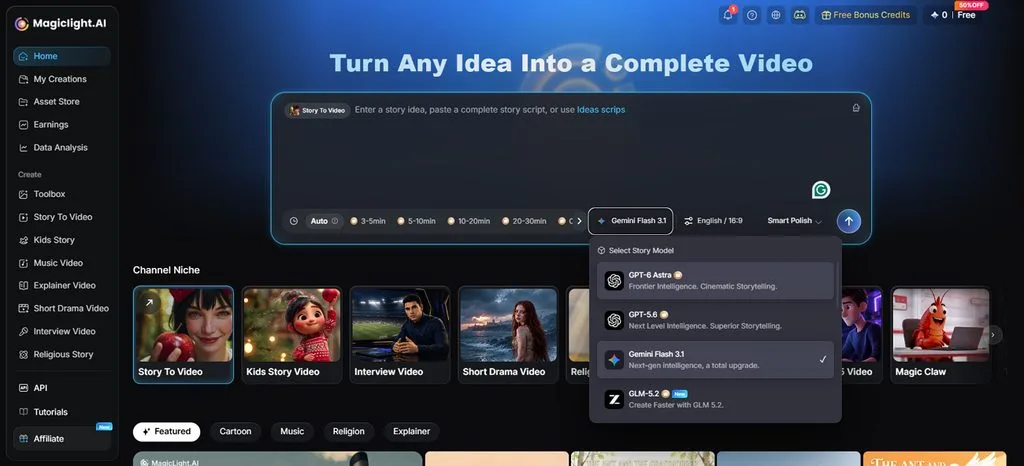
- Multiple Story Models: MagicLight AI provides 14 story models for scripts, dialogue, and longer creative stories. GPT-6 Astra offers another choice for developing detailed stories with longer narrative structures.
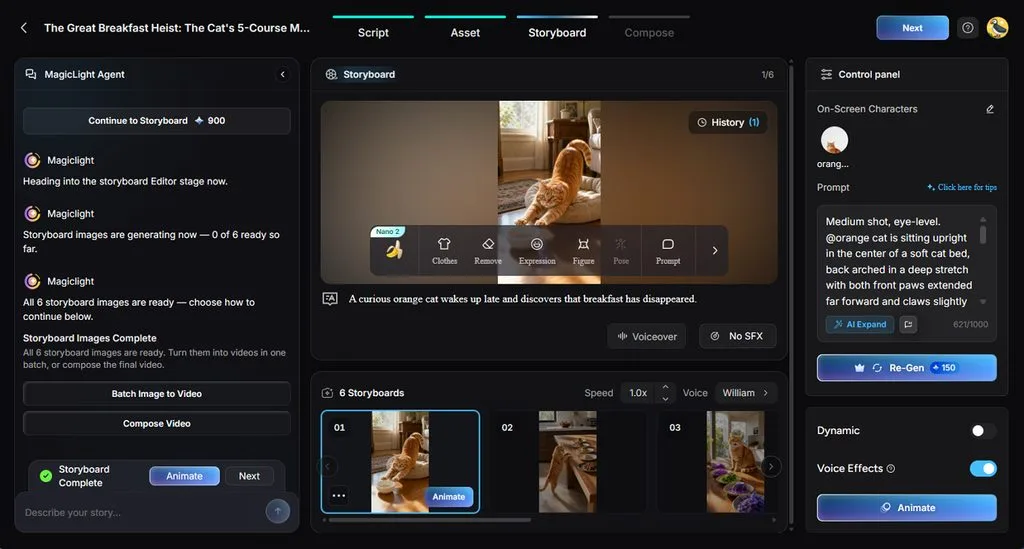
- Nano Storyboard: Nano Storyboard separates stories into scenes, letting creators review details before video generation. Adjust clothing, expressions, individual shots, and choose among 50+ poses for each character.
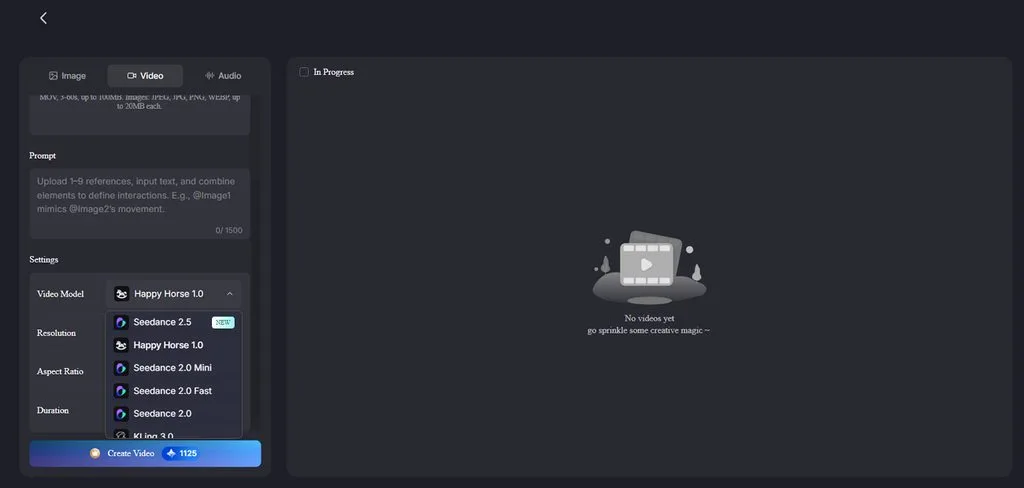
- AI Video Models: Choose from 20 AI video models designed for different video generation styles and needs. Options include Happy Horse 1.0, Seedance 2.5, and other models for varied results.
Guide to Creating a Video With MagicLight AI
MagicLight AI provides an AI tool for free, helping creators start video projects easily. Follow the steps below to make AI videos for free with MagicLight AI:
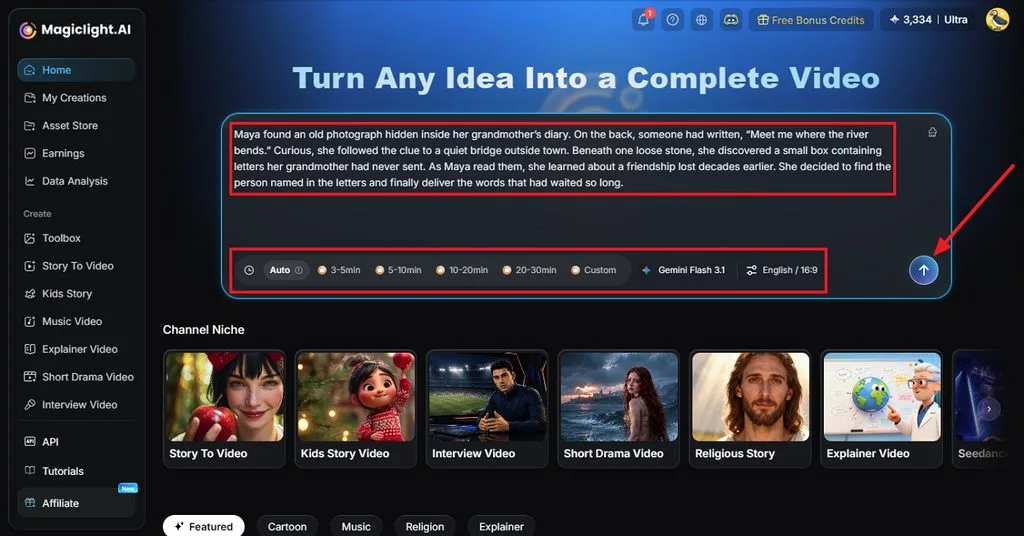
Step 1. Enter Your Video Script
Open Story to Video and add the script you want to turn into a video. Select the duration, model, language, and aspect ratio, then click Send to continue.
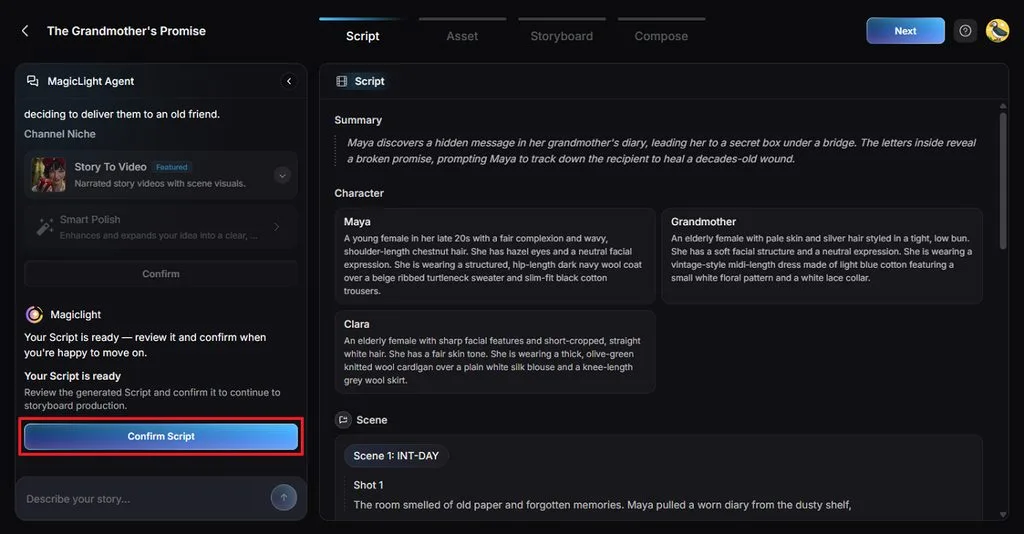
Step 2. Review the Video Plan
MagicLight Agent organizes your script into a Summary, Characters, Scenes, and Shots. Review each section, make any necessary changes, and click Confirm Script when everything looks correct.
Step 3. Select Your Video Settings
Choose a Visual Style that fits the type of video you want to create. Select Slides Video or Animate Video, adjust the available options, and confirm your settings.
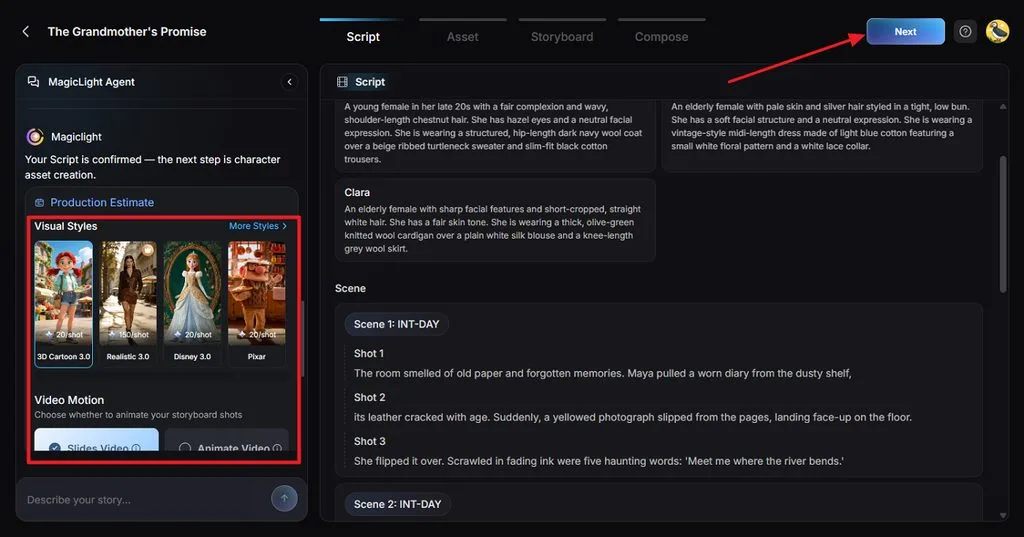
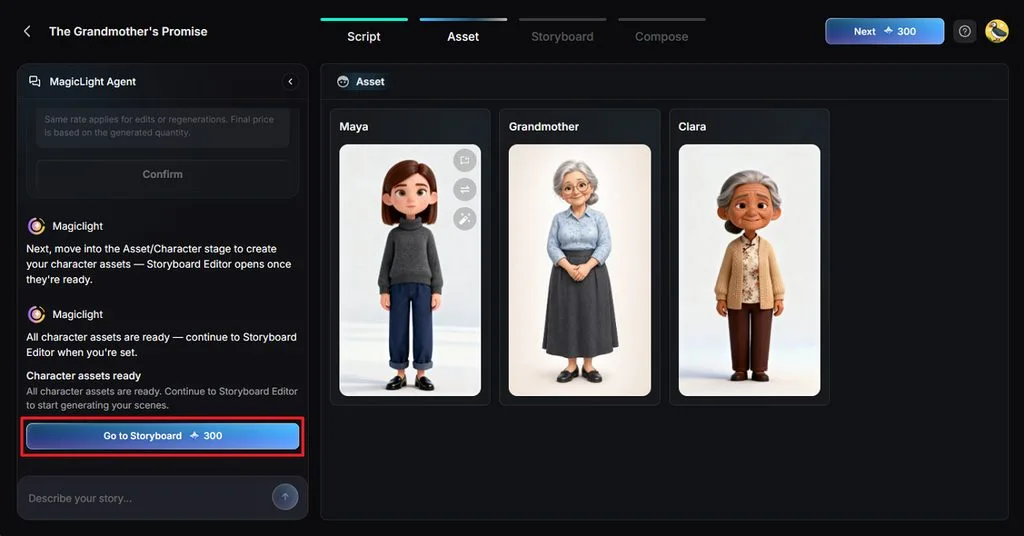
Step 4. Check the Character Assets
Review the character images MagicLight AI creates from the people described in your script. Make any needed changes to the characters, then click Go to Storyboard to continue.
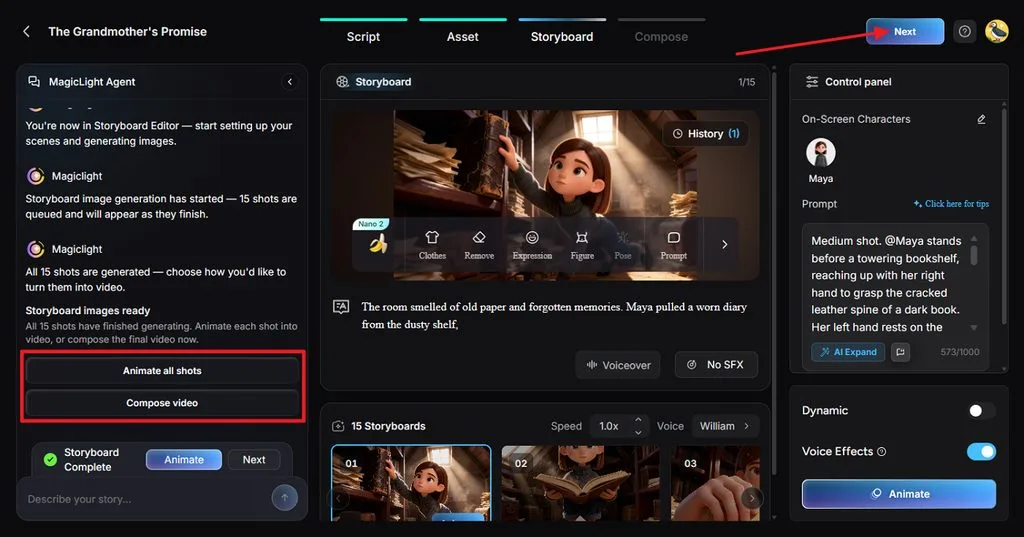
Step 5. Customize the Storyboard
Review each storyboard shot and change the Clothes, Expression, Figure, Pose, or Prompt where needed. You can also adjust voices and effects before choosing Animate all shots or Compose video.
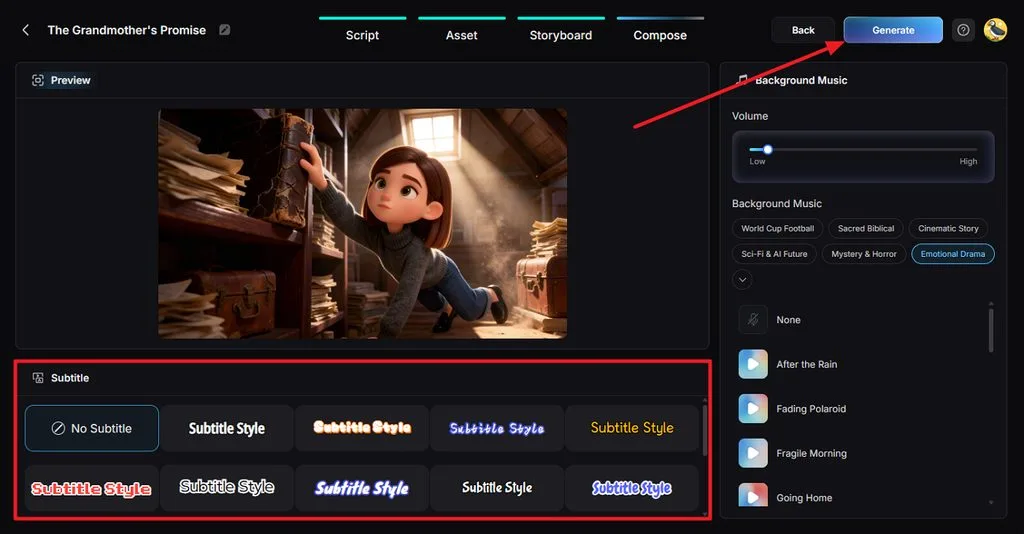
Step 6. Add Subtitles and Music
Preview your video and select a Subtitle Style, or choose No Subtitle when preferred. Adjust the Background Music and volume, then click Generate to create your final video.
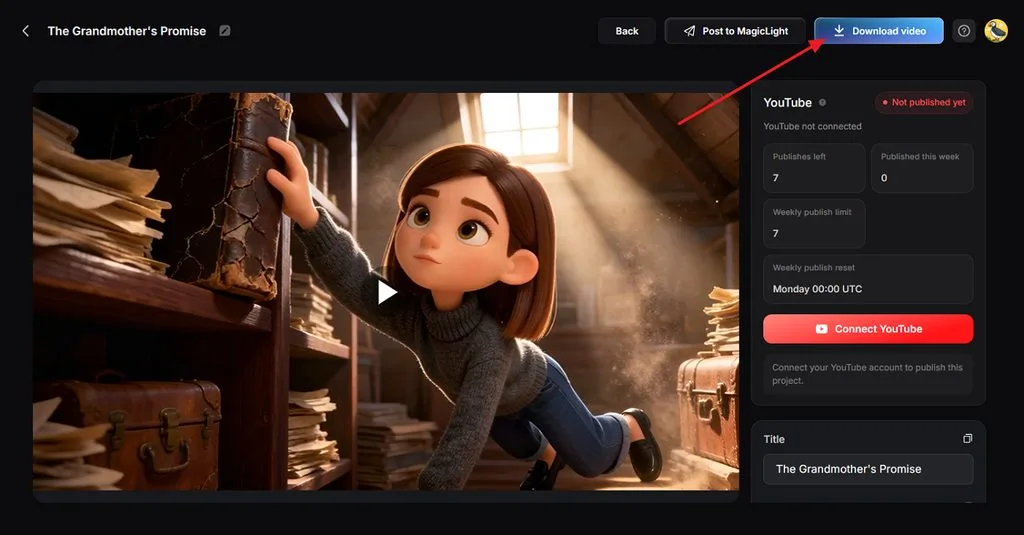
Step 7. Download Your AI Video
Watch the completed video and review its scenes, voices, subtitles, music, and overall pacing. Once everything looks right, click Download video to save your finished AI video.
Conclusion
In summary, free AI tools help creators handle different tasks without paying for expensive software. Canva and Adobe Express support design, while CapCut and VEED simplify everyday video editing tasks. Leonardo AI supports visual experiments, while ChatGPT helps creators develop scripts, ideas, and research easily. MagicLight AI brings video creation together, letting creators build complete stories using free credits.
FAQs on Free AI Tools
1. What are free AI tools for content creation?
These tools help creators produce scripts, images, designs, and videos without paying money upfront. Free artificial intelligence tools usually provide basic features with limits on usage or exports.
2. What can I use free AI tools for?
Creators use these tools for scripts, captions, graphics, images, subtitles, and video production tasks. AI tools can support several content tasks without requiring expensive creative software.
3. Can I create videos with a free AI tool?
Several free AI tools can create videos, although available features and usage limits vary widely. MagicLight AI uses free credits to turn written scripts into complete animated video projects.
4. Are free AI tools suitable for beginners?
Many free AI tools provide simple controls, templates, and guidance for beginners starting projects. MagicLight AI guides new creators through planning, characters, scenes, storyboards, and video generation.
5. Which free AI tool is good for video creation?
MagicLight AI supports complete video creation by turning one script into connected animated scenes. Creators can customize characters, storyboards, voices, subtitles, music, and other details before final generation.





