



Creative projects often use different AI models for making images, videos, audio, and other content. TapNow AI brings these creative tools together inside one simple workspace for easier project management. Its visual canvas helps users connect images, videos, text, audio, and references during creative projects.
The AI Agent can plan creative tasks, generate content, and keep project materials organized. However, credit costs and shorter video lengths can create challenges when producing longer storytelling projects. This guide explores TapNow AI features, uses, pricing, benefits, limitations, and its best storytelling alternative.
Part 1. What Is TapNow AI
The TapNow app combines creative tools, AI models, and a canvas for managing projects. Let’s see what TapNow offers creators and how its main features support creative work.
Introduction to TapNow AI
TapNow AI offers a connected creative canvas for ads, ecommerce visuals, films, and storytelling projects. Each canvas holds text, images, videos, audio, scripts, references, research, and generated creative results together. Creators connect nodes, letting product images or other materials guide later image and video generations.
TapNow works in desktop browsers and offers desktop apps for Windows and Apple-silicon Macs. Its full canvas is also accessible on iPad and Android tablets. Some video generation options reach 30 seconds, depending on the selected settings and generation method. Its Agent can research ideas, plan creative tasks, and run generation steps inside projects automatically.
Key Features of TapNow AI
- Planning Agent: TapNow Agent writes scripts, plans shots, creates tasks, and shows estimated Tapies beforehand.
- Elements for Consistency: Elements maintain consistency using Seedance 2 series, Seedance 2.5, and MiniMax H3 models.
- Playlists for Assembly: Playlists combine clips for trimming, splitting, reordering, and exporting one merged MP4 file.
- Built-In Editing: Redraw, Relight, Outpainting, Cutout, Trim, Continue Video, and Video Retake edit content directly.
- Team Canvases: Teams co-edit canvases, add comments, publish on TapTV, and let others clone projects.
Pros and Cons of TapNow AI
TapNow AI offers flexible creative control, but its canvas requires more user involvement. Let’s explore its main advantages and limitations before choosing it for projects:
Pros
- One canvas keeps references, drafts, and generated content together.
- Tapies estimates appear before generation, helping users manage costs.
- Team canvases support live editing, sharing, and member collaboration.
- Desktop Agent can organize files inside authorized local folders.
Cons
- Final Tapies usage may differ from estimates shown beforehand.
- Subscription Tapies expire 60 days after each batch arrives.
- Video duration varies by model, complicating longer storytelling projects.
- Node-based canvas workflows may require more time to learn.
Part 2. How to Use TapNow AI for Creative Projects
The TapNow app lets creators build projects from a blank canvas into complete visual content. Follow the steps below to create, organize, edit, and export your creative project with ease:
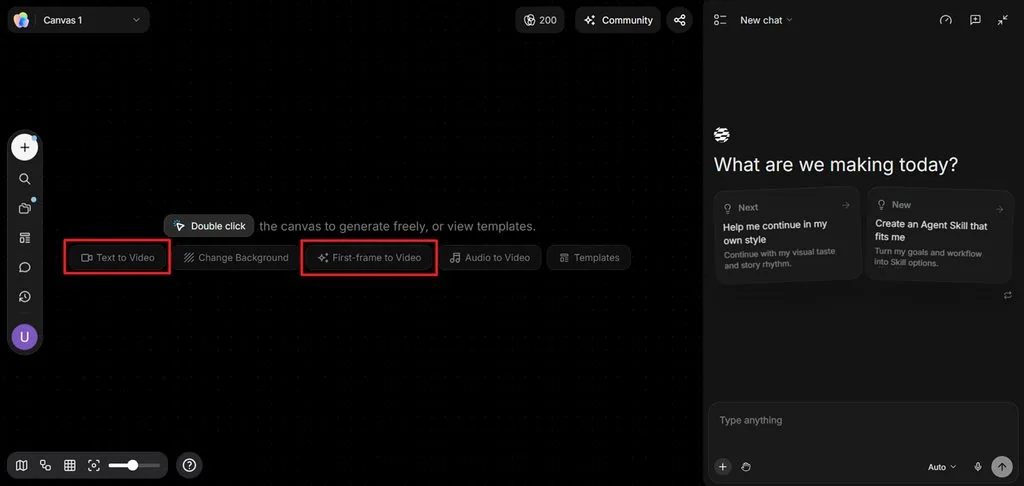
Step 1. Start by creating a new project in TapNow AI. Choose a video generation method from Text to Video or Image to Video.
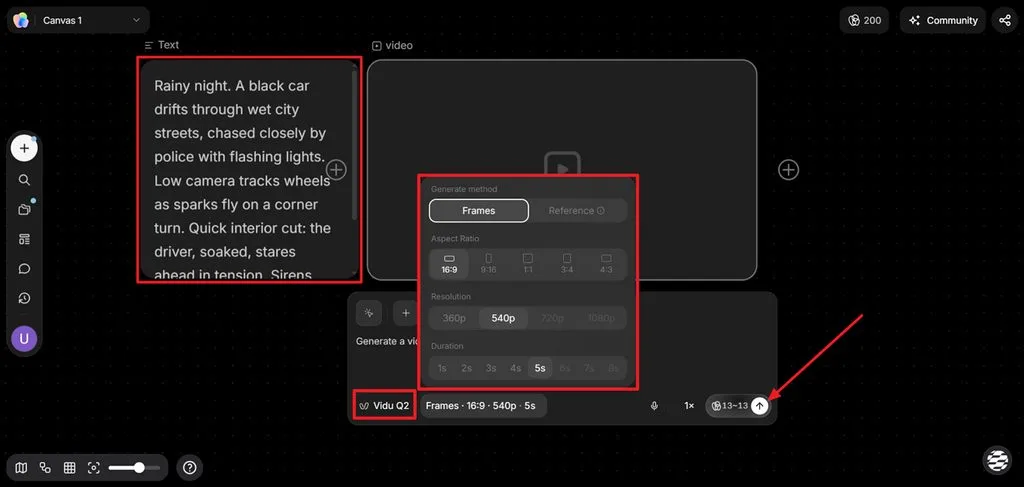
Step 2. If you chose Text to Video, type your video idea in the Text description. Ask AI to create a video based on the description. Afterward, choose an AI Model, select Aspect Ratio, Resolution, and Duration. Once done, press the Send button to begin the video generation process.
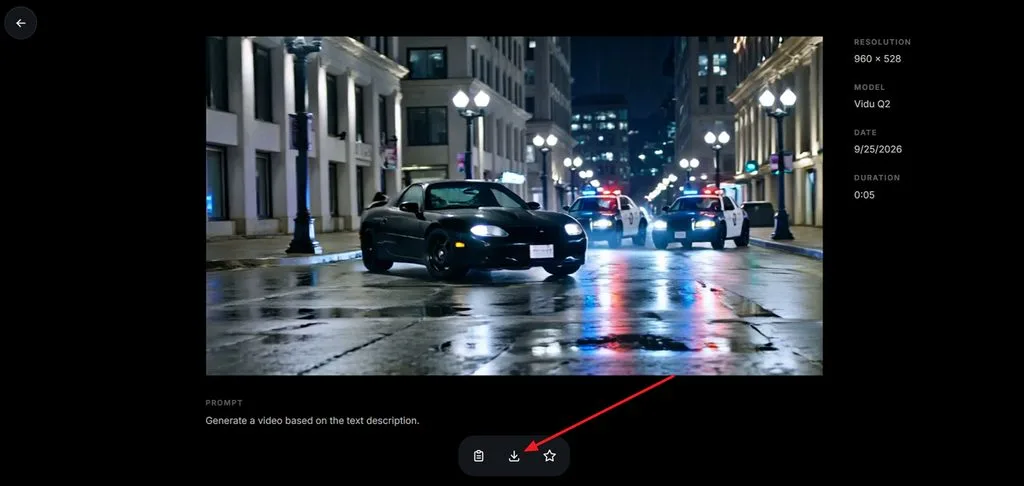
Step 3. After the video is generated, play the video and see if any amendments are required. If any adjustments are required, use the same chat section. If the video is finalized, press the Download button to save the video.
Part 3. Best TapNow AI Alternative for Storytelling
Long storytelling projects become difficult in TapNow AI because videos are generated as separate clips. Creators may need to generate several shots, organize them, and combine everything manually afterward. MagicLight AI offers a simpler storytelling workflow by turning written scripts into connected video scenes. Users can enter up to 12,000 characters and create videos lasting up to 50 minutes.
This makes the platform suitable for longer stories that require many connected scenes and sequences. It also helps maintain consistent characters, settings, and important visual details across connected scenes throughout longer storytelling projects. Its guided process helps beginners produce longer videos without managing complicated node-based canvas workflows.
Key Features of MagicLight AI
- MagicLight Agent: Share your concept, and the agent maps out the whole video process. Scripts, storyboards, characters, and visual choices are prepared before generation even begins.
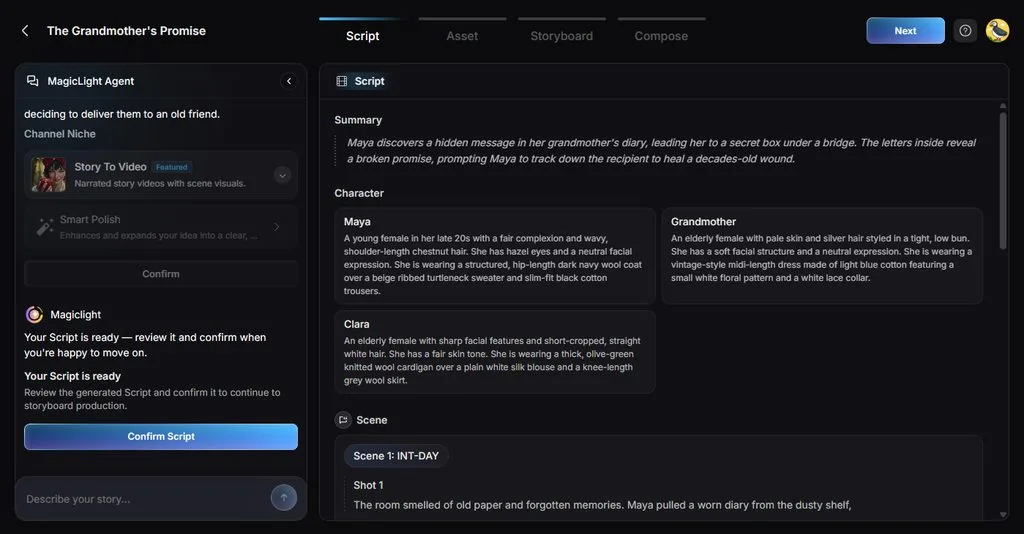
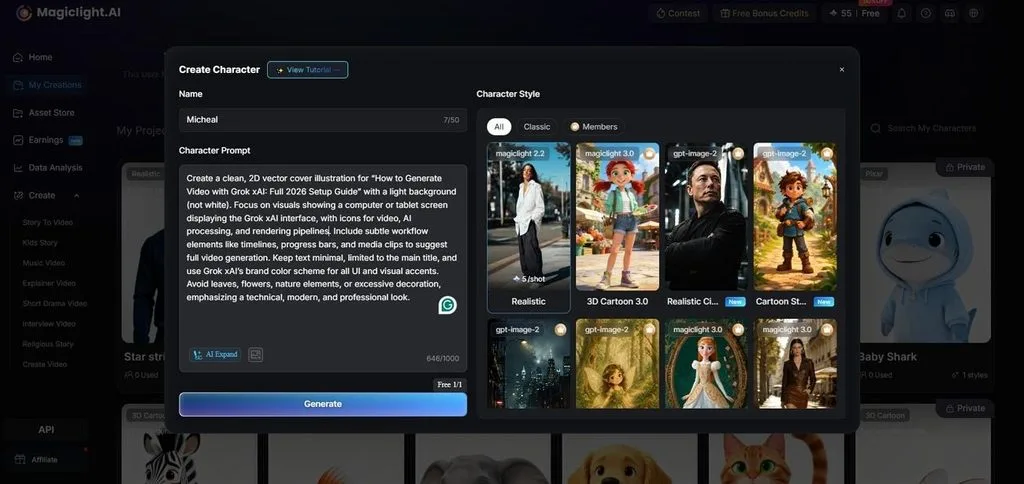
- AI Character Creation: Create characters using descriptions up to 1,000 characters or uploaded reference images easily. Saved characters remain consistent across future projects through your personal character library automatically.
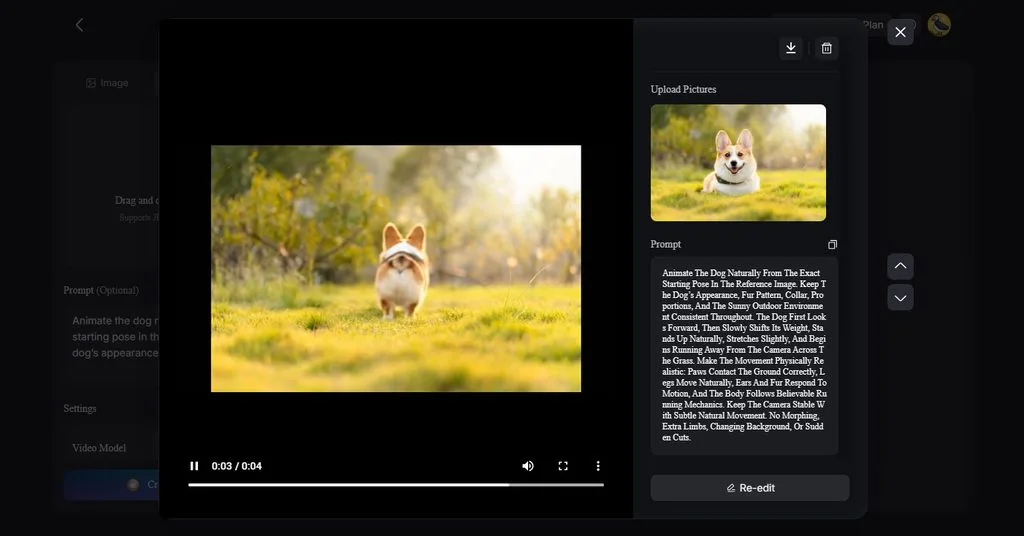
- Image to Video: Upload up to 5 reference images to guide video generation more accurately. Prompts support up to 1,500 characters for detailed instructions and stronger creative control.
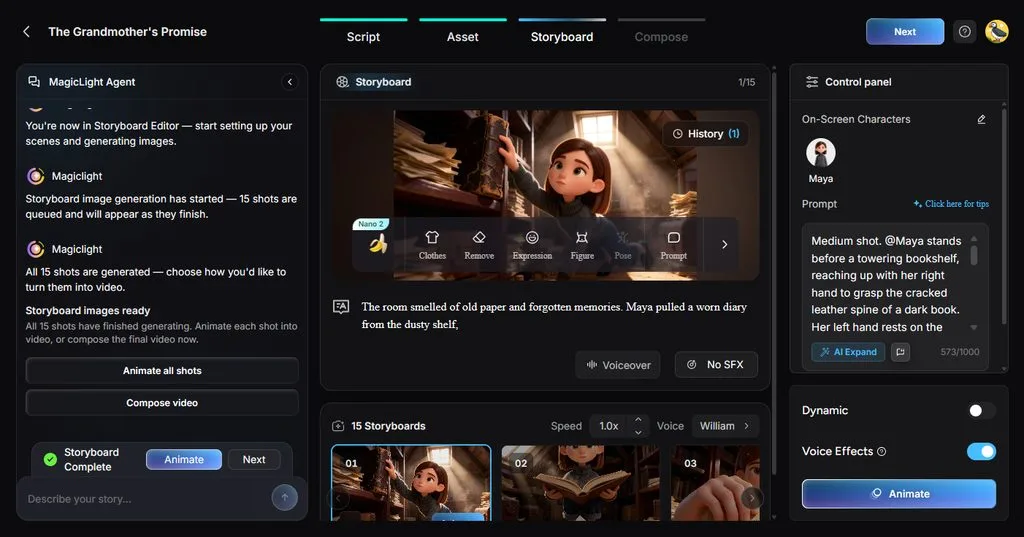
- Storyboard Scene Control: Creators can adjust scenes using 50+ poses and detailed timing controls before generation. Flexible storyboards help refine specific moments before the final video rendering process begins.
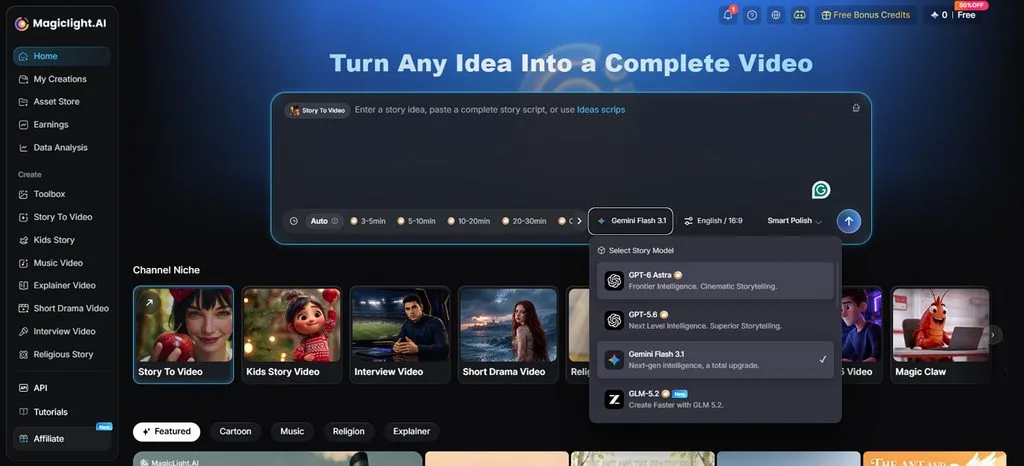
- Story Models: MagicLight AI provides 14 story models for different writing, planning, and development needs. Options include GPT-6 Astra and Gemini Flash 3.1 for developing different story ideas.
Part 4. TapNow AI vs. MagicLight AI: Key Differences
TapNow Agent supports flexible creative workflows, while MagicLight AI focuses on complete storytelling projects. The table below compares their main features, video capabilities, consistency, and creative workflows:
| Feature | TapNow AI | MagicLight AI |
| Core Approach | Node-based canvas connecting images, videos, audio, and references | Story-focused workflow turning scripts into connected videos |
| AI Agent | Plans scripts, shots, research, and generation tasks | Plans ideas, scripts, storyboards, characters, and video production |
| Longest Output | Up to 30 seconds with supported video models | Up to 50 minutes for long-form video projects |
| Character Consistency | Elements support Seedance 2 series, Seedance 2.5, MiniMax H3 | Saved characters stay consistent across different story scenes |
| Video Models | Includes Seedance 2.5, MiniMax H3, and Wan 3.0 | Offers 20 video models, including Seedance and Kling |
| Narration and Captions | Audio nodes support speech, music, and sound generation | Offers 37 AI voices and 16 subtitle styles |
| Platforms | Web, macOS, Windows, iPad, and Android tablets | Web plus dedicated iOS and Android mobile apps |
| Pricing Plans | Subscription plans and separate Tapies top-up options | Standard, Plus, Pro, Ultra, and Ultimate plans |
| Free Access | New-user gifted Tapies remain valid for 30 days | Limited free credits available without a payment card |
| Best For | Flexible visual workflows, ads, products, and short videos | Longer storytelling projects with connected scenes and characters |
Conclusion
To conclude, TapNow AI combines flexible creative tools for images, videos, audio, and connected workflows. However, shorter clip generation and model-specific consistency options can complicate longer storytelling projects for creators. MagicLight AI supports longer narratives with consistent characters, connected scenes, and videos reaching 50 minutes. Creators can also create AI videos free before exploring paid options for larger storytelling projects.
FAQs on TapNow AI
1. What is TapNow AI mainly used for?
The TapNow app helps create advertisements, product visuals, and short cinematic video projects easily. Its connected canvas keeps references, generated assets, and editing workflows organized in one place.
2. Is TapNow AI free to use?
TapNow AI gives new users a limited number of free Tapies that expire after 30 days. Continued generation requires available Tapies from subscriptions or additional top-ups purchased when needed later.
3. Can TapNow AI create videos from text and images?
It supports text-to-video and image-to-video generation through its connected creative canvas directly. MagicLight AI also turns written ideas or reference images into complete video content.
4. What is the best TapNow AI alternative for storytelling?
MagicLight AI offers a guided workflow designed for creating longer and connected storytelling videos. It supports consistent characters, connected scenes, and videos reaching up to 50 minutes.
5. Which AI video tool is best for turning stories into videos?
MagicLight AI turns scripts up to 12,000 characters into complete animated storytelling videos. Its guided workflow supports longer narratives without manually joining many separately generated video clips.





