Choosing the best AI character generator depends on your project needs and character goals. Strong character consistency keeps faces, clothing, and details similar across different images and scenes. This consistency matters for comics, mascots, stories, videos, and other projects using recurring characters.
Price matters because free plans may limit credits, privacy, features, or commercial usage rights. Some generators create still images, while others can produce talking videos and complete stories. This guide compares useful options to help you choose the right tool for projects.
Part 1. 5 Best AI Character Generators for Creators
Good character creation AI should maintain consistent details across different images and scenes. Photo references and usage rights also help creators build characters for various projects. Let’s explore 5 useful tools that make AI character creation easier for creators.
Best For: Storytellers needing consistent characters across images and videos.
This platform helps creators keep the same character appearance across different images and scenes. Users can create characters with written descriptions or upload reference photos for accurate results. Saved characters remain available for future projects, making consistent character creation easier for creators.
Its Image to Video tool turns character images into short clips with natural movement. The Lip Sync tool adds matching speech and voice movements to created character videos easily. MagicLight Agent can develop ideas and create scripts based on the selected content niche.
Key Features
- Photo to Character: Users upload reference photos or write prompts up to 1,000 characters. This avatar generator uses facial details, hairstyles, clothing, and descriptions for characters.
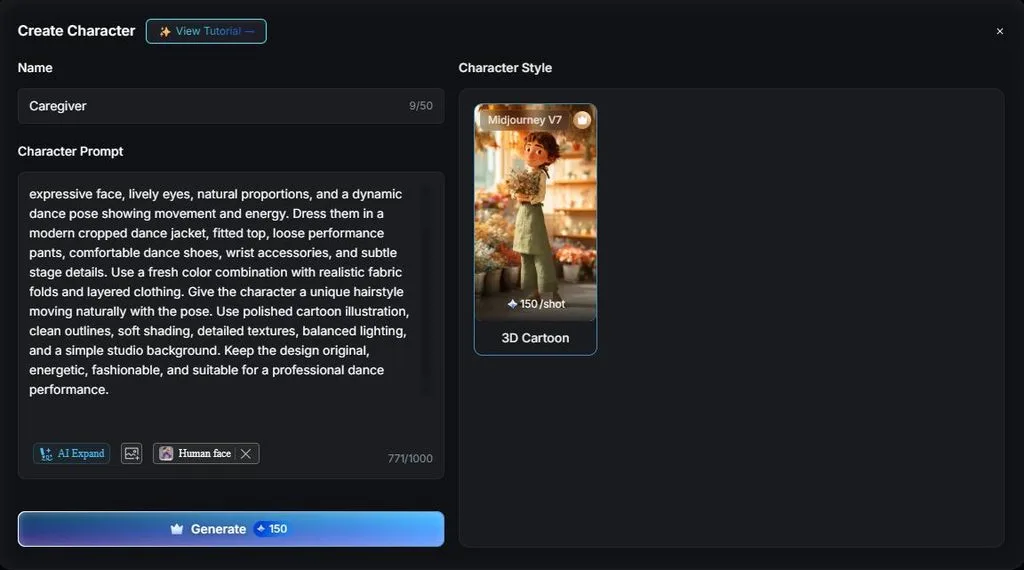
- Style Switching: Characters can switch between photorealistic, 3D cartoon, and anime visual styles. Their main appearance stays recognizable when creators change the selected visual style.
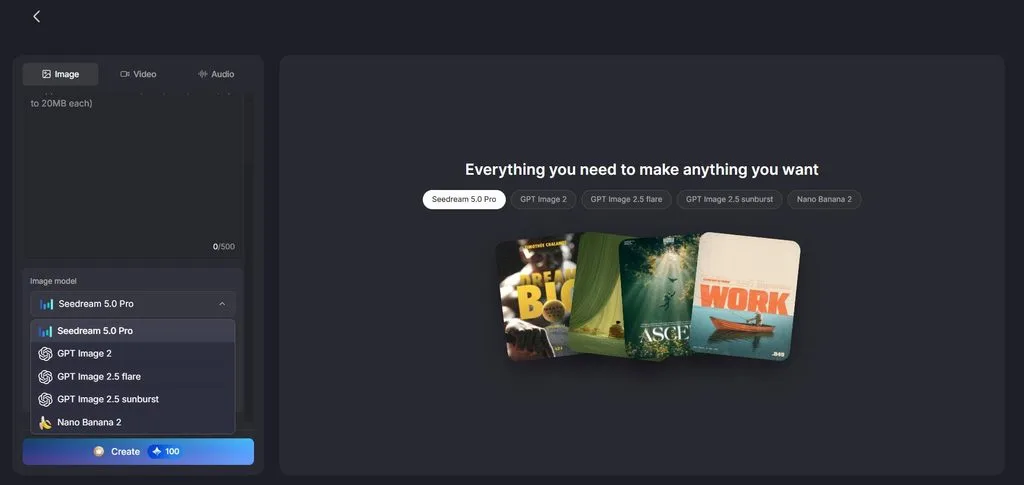
- Image Models: Creators can access 5 image models, including Nano Banana 2 and GPT Image 2. These models help compare different results using the same character idea.
- Story to Video: This feature supports prompts containing up to 12,000 characters easily. Longer prompts help creators keep detailed story ideas together during production.
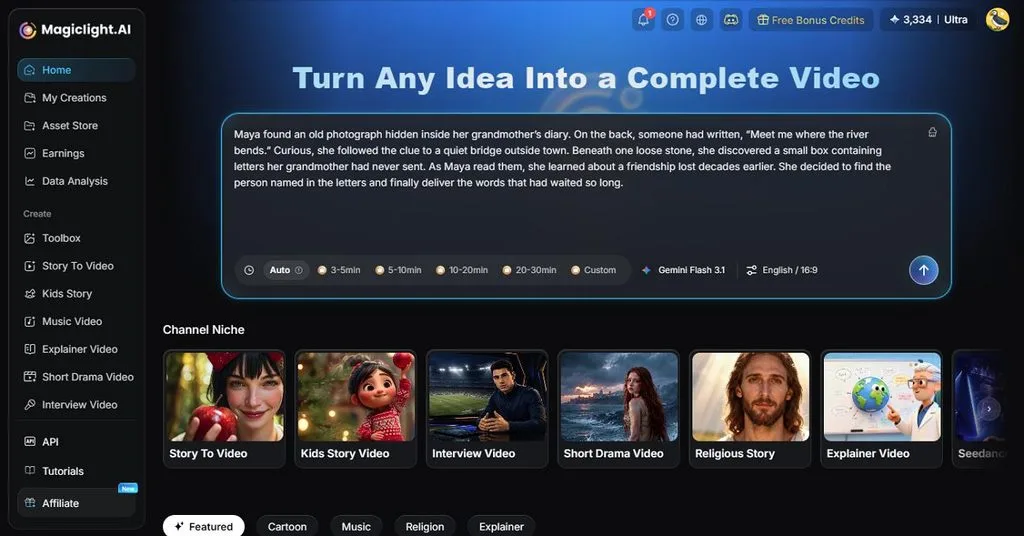
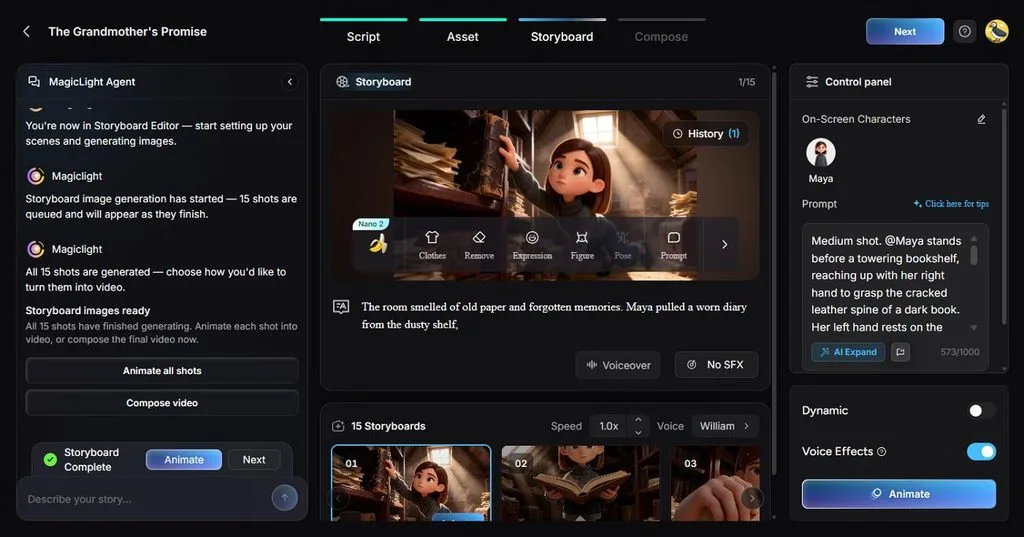
- Nano Storyboard: Storyboard provides more than 50+ poses for different character reactions. Creators can select expressions and poses before building individual video scenes.
User Reviews
- Wendy W. Banta: “Scenes can be adjusted or merged easily inside the editor.”
- Monika Dillingham: “Creators who need quick visuals can use MagicLight without complex editing skills.”
- Wendy W. Banta: “Magiclight is one of the first Ai platform i used and one of many i tried….”
Best For: Creators developing recurring mascots and branded characters.
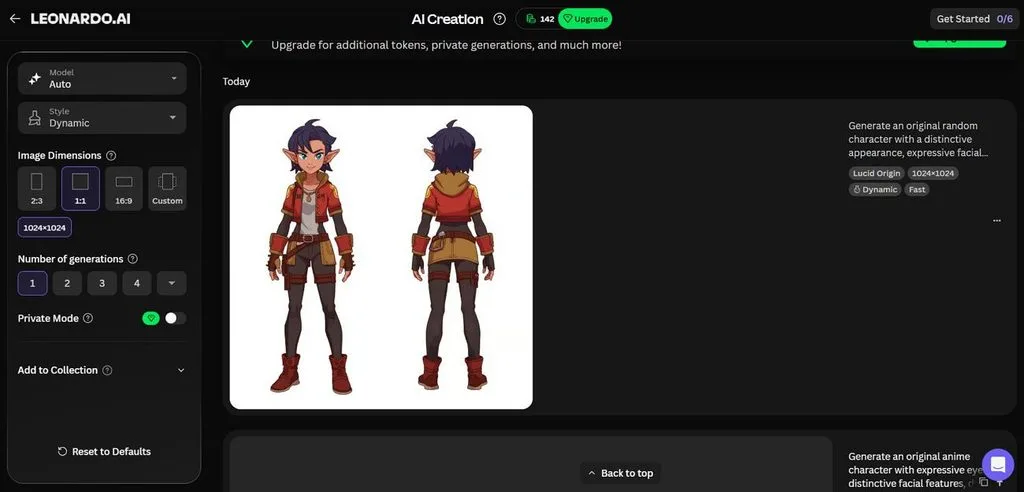
A free AI character generator that helps creators test character ideas before building larger projects. Leonardo.AI uses reference images to preserve facial structure and wardrobe across new character generations. Creators can refine physical features and place finished characters inside different environments and scenes.
Key Features
- Character Reference offers low, mid, or high strength for controlling character likeness.
- Elements trains custom LoRA models for repeatable characters using uploaded image datasets.
- Multi-Character Scene Builder combines different referenced characters inside one generated scene together.
User Reviews
- Taylor: “I have recently joined Leonardo.AI. Sign up was very easy and straighforward…”
- Sven H.: “They have an incredible catalogue of tools and you can't beat the pricing.…”
- Ishan A.: “Advanced tools, like video generation, drain credits very quickly.…”
Best For: Illustrators creating stylized characters and concept artwork.
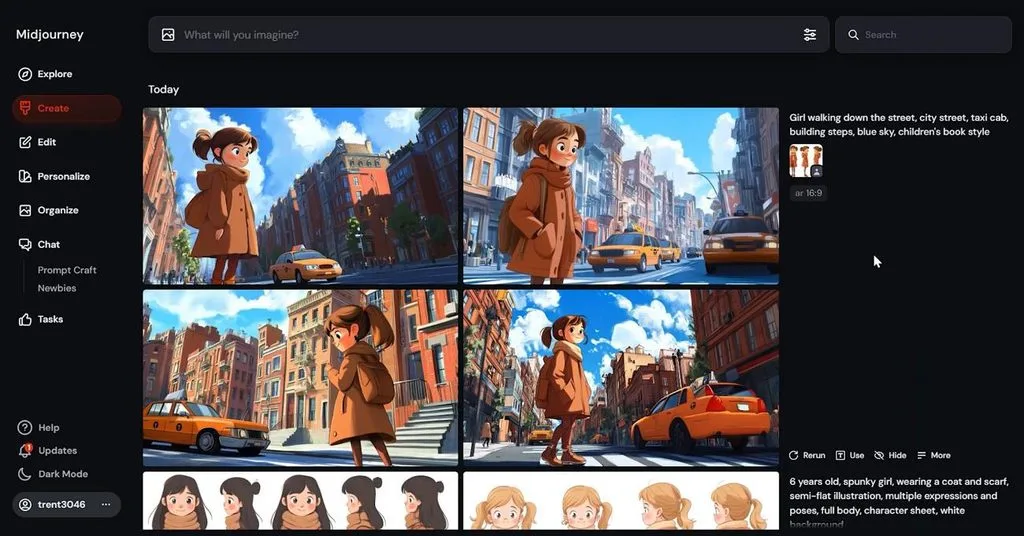
This AI character picture generator works well when distinctive artwork matters across creative projects. Midjourney V8.2 improves image quality and personalization while supporting detailed character-focused visual creation. Its creative controls help artists develop characters with recognizable aesthetics across different generated scenes.
Key Features
- Edit Model combines up to 4 reference images into new character compositions.
- Style Reference transfers colors, textures, lighting, and medium without copying subjects directly.
- Editor supports inpainting and outpainting for changing selected areas or expanding scenes.
User Reviews
- Roham Sadaghiani: “Amazing quality artworks, but we need a way for long prompts to be used for V8…”
- Alejandro Perez: “Been using midjourney for over 3 years now. It's great, it can bring to life my craziest concepts…”
- Marc-Antoine: “Even when using Claude to prompt it, results are weird, inconsistent. Got 6 usable pictures for a whole month usage..”
- Artbreeder
Best For: Artists experimenting with blended character face designs.
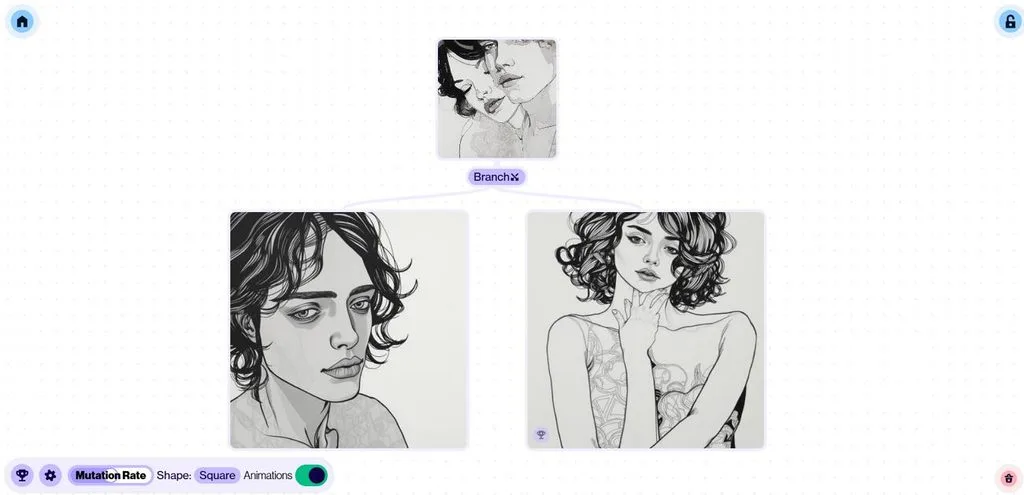
Artbreeder offers an AI character generator from photo inputs through its browser-based creative tools. Creators blend existing images and adjust visual traits to shape unique faces and appearances. Its image-mixing workflow suits users who prefer visual experimentation instead of detailed written prompting.
Key Features
- Splicer 2 creates branching image variations for exploring different character appearances quickly.
- Mixer 2 combines up to 4 images with additional text guidance.
- Composer controls separate images for style, content, and composition during generation.
User Reviews
- Caryes Moore: “Now with the boom of AI going on, they've updated their site so much that it's like a whole different platform…”
- Wilbur Phelps: “ARE VERY DECEPTIVE WITH THEIR BILLING…”
- Anonymous: “So I visualized them with artbreeder and they came out great…”
Best For: Video creators building recurring characters across scenes.
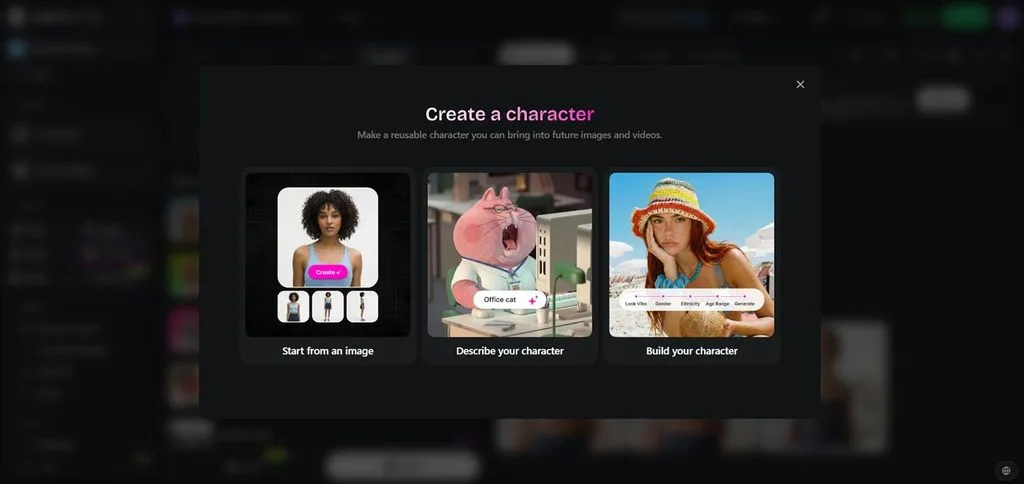
Building recurring characters becomes easier when character creation AI preserves important visual details. OpenArt creates reusable characters from reference images and places them across different scenes. Its character workflow also supports nonhuman subjects, making it useful beyond realistic human designs.
Key Features
- Character 2.0 builds consistent characters using only 1 reference image initially.
- Motion Sync transfers full-body movements and gestures from uploaded reference videos.
- Character tools can place multiple consistent characters together within one generated scene.
User Reviews
- Sait: “I have only had good experiences with OpenArt AI. You have all the leading AI tools for image..”
- Ben Bowdoin: “OpenArt has been awesome to use. I've been using them for several years..”
- MAY: “Director Mode credit costs changed dramatically and support has not responded..”
Part 2. Quick Comparison of the Best AI Character Generators
Finding the best AI character generator depends on your specific creative needs and projects. Some tools focus on images, while others support moving characters and longer video projects. The table below compares important features to help you find a suitable character generator:
| Tool | Consistency Method | Video Output | Free Access | Pricing Plans | Commercial Use |
| MagicLight AI | Saved characters from photos or written profiles | Clips, lip sync, and videos up to 50 minutes | Limited free credits, no card needed | Standard, Plus, Pro, Ultra, Ultimate; from $7.50/month (yearly) | General commercial license on paid plans |
| Leonardo.AI | Character Reference, custom Elements, multiple references | Text-to-video and image-to-video with multiple models | 150 fast tokens daily; creations are public | Essential $12, Premium $30, Ultimate $60/month | Commercial use allowed on free and paid plans; paid users own outputs |
| Midjourney | Edit Model with up to 4 reference images | 5-second image-to-video clips, extendable to about 21 seconds | No regular free plan or trial | Basic $10, Standard $30, Pro $60, Mega $120/month | Commercial use included; companies over $1M revenue need Pro or Mega |
| Artbreeder | Splicer, gene controls, and image mixing | Animator creates videos from still images | Free account with public creations | Starter, Advanced, Champion; from $7.49/mo yearly | Generated images are released under CC0 for commercial use |
| OpenArt | Character 2.0 using a single reference image | Multiple video models, Motion Sync, lip sync, and up to 30-second clips | Limited free access for testing | Starter $14, Plus $34, Pro $56, Wonder $240 monthly | Commercial use starts with Plus |
Conclusion
To summarize, the best AI character generator depends on how your characters will be used. Some tools create characters for artwork, while others maintain consistency across different creative projects easily. MagicLight AI combines character creation, movement, speech, and longer videos within one simple creative workflow. Compare consistency, video features, customization, and usage rights before selecting any tool for your project.
Frequently Asked Questions
- What is the best AI character generator in 2026?
MagicLight AI helps creators build characters for images, speaking clips, and longer video projects. Saved characters remain consistent while supporting movement, lip sync, and detailed video creation workflows. This approach works well when one character appears across several different types of content.
- Can AI character generators create consistent characters?
Leading generators use reference images and dedicated controls to maintain recognizable character designs. Some platforms also save or train characters for reuse across different images and scenes. Strong references also help AI generate character designs with better consistency across creative projects.
- Can I use AI-generated characters for commercial projects?
Many AI character tools allow generated characters to be used for different commercial projects. However, commercial rights often depend on your selected plan and each platform’s current terms. Always review licensing terms before using generated characters for client work or paid campaigns.
![How to Remove People from Photos in 2026 [Full Guide]](https://magiclight.ai/wp-2/wp-content/uploads/remove-people-from-photos-guide.jpg-300x197.webp)
![6 Best Picture Modification Apps in 2026 to Try [New List]](https://magiclight.ai/wp-2/wp-content/uploads/best-picture-modification-apps-for-photos.jpg-300x200.webp)
![How to Turn Audio File Into Video in 2026 [Full Guide]](https://magiclight.ai/wp-2/wp-content/uploads/audio-to-video-conversion-guide.jpg-300x169.webp)