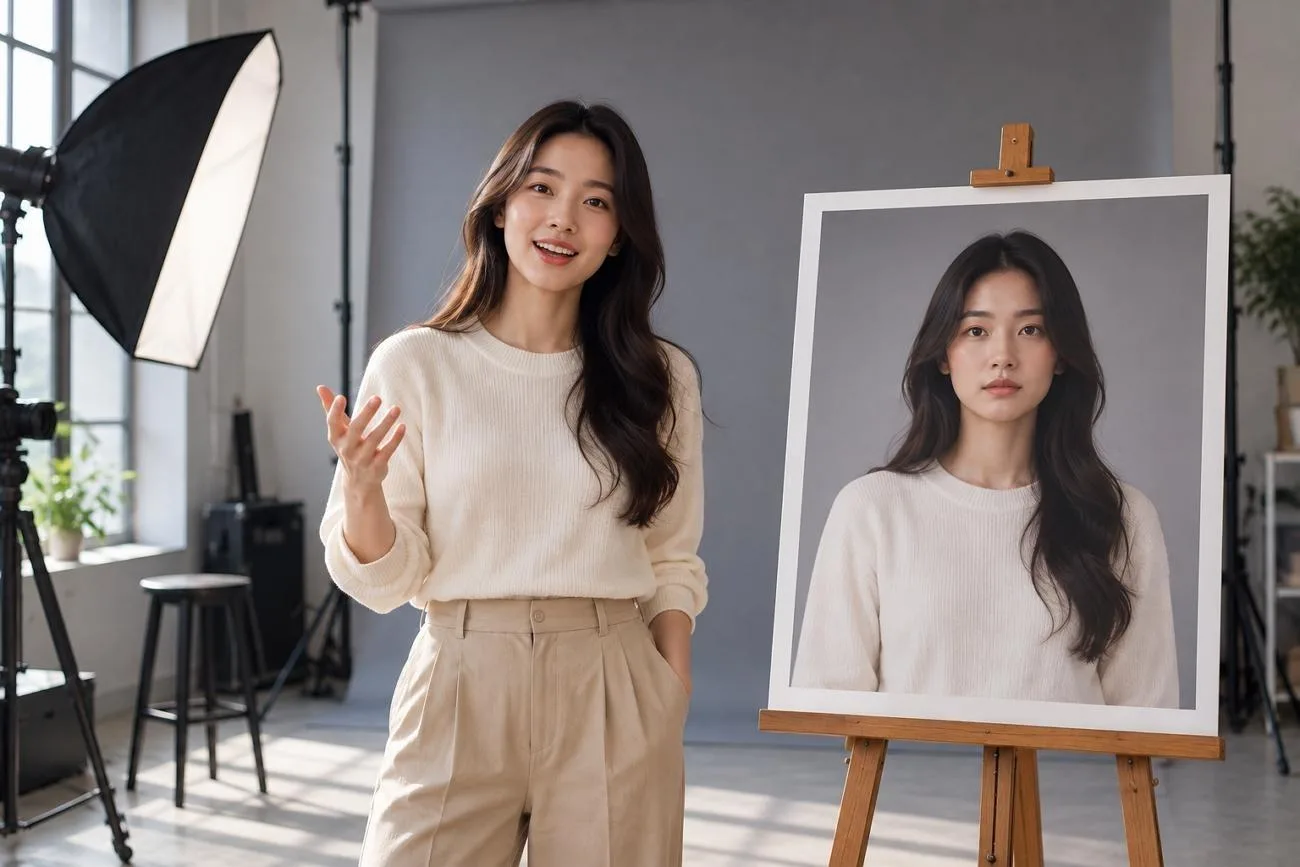
OmniHuman AI turns one photo and audio into realistic videos of people speaking naturally onscreen. It animates faces, gestures, and body movements to match the provided voice with precision. Users can create close-up portraits or full-body videos from a single still image.
Moreover, OmniHuman AI 1.5 adds text prompts for camera movement, actions, and character interaction control. It can handle several characters speaking in turn within one continuous video scene. This guide reviews OmniHuman AI features, uses, limits, pricing, and MagicLight AI alternative options.
Part 1. OmniHuman AI Features and Use Cases
ByteDance introduced OmniHuman AI in February 2025 after training it on 18,700 hours of videos. OmniHuman AI 1.5 arrived in August 2025 with better speech understanding before creating human animations.
Key Features
Both OmniHuman AI versions use one image with a voice track to create animated videos. Below are the key features that give users more control over the generated video:
- Audio-Driven Performance: OmniHuman AI matches lip movements, facial expressions, and gestures with supplied speech or songs.
- Image-to-Video: OmniHuman accepts descriptions up to 500 characters and creates 10-second videos directly.
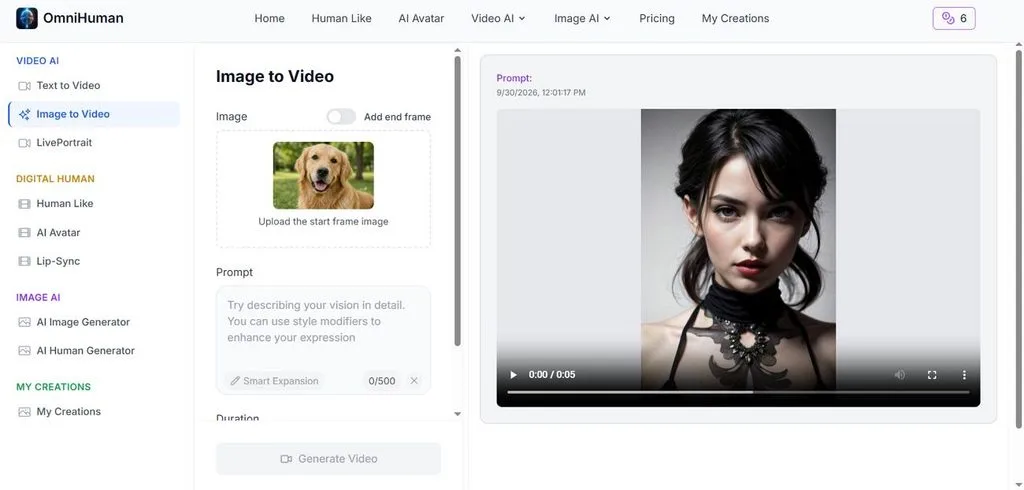
- Multi-Person Scenes: It supports multiple people speaking and interacting naturally within one continuous generated video.
- Text-to-Video Generation: OmniHuman AI turns written prompts into videos with selectable aspect ratios and duration settings.
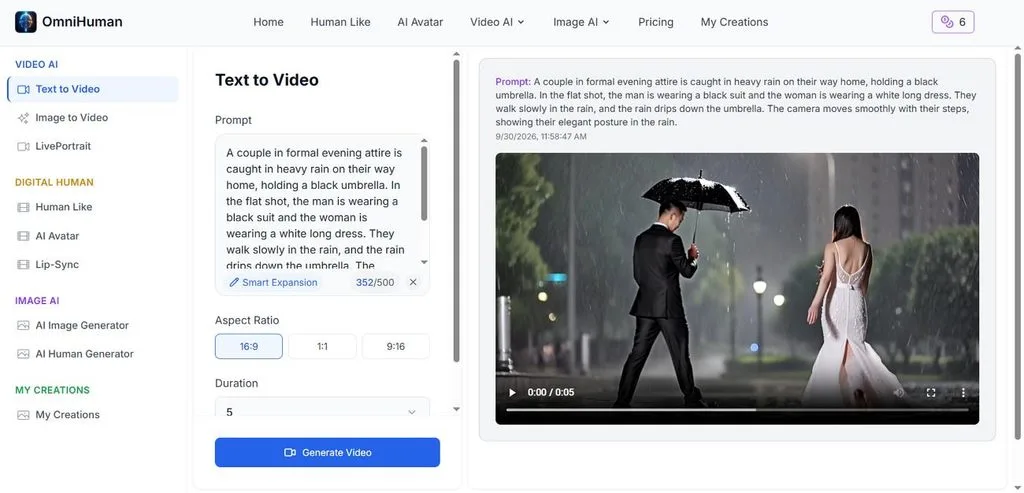
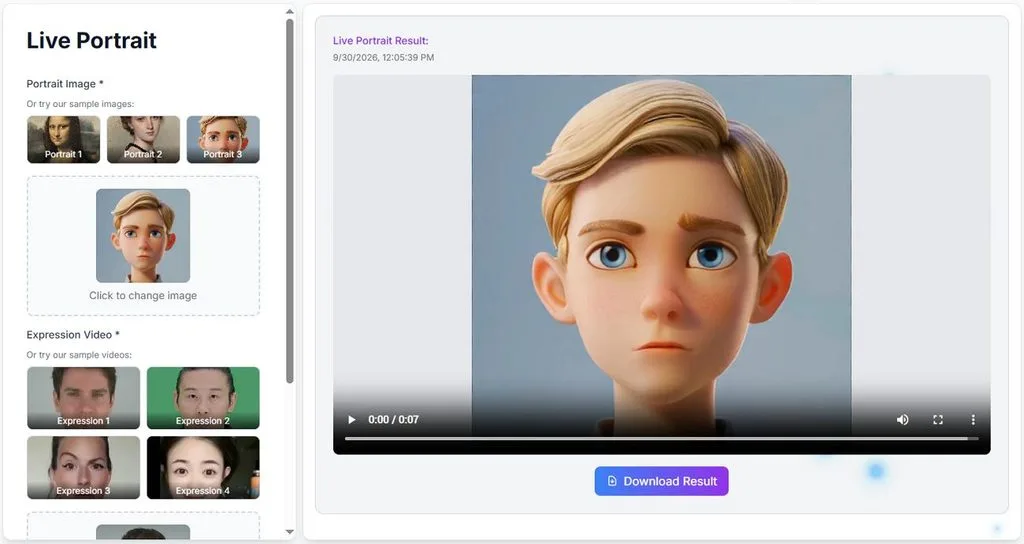
- LivePortrait: Turn still portrait images into animated videos with natural facial expressions and smooth movements.
Use Cases
AI OmniHuman helps creators produce human performances without arranging cameras, actors, or full production crews. Common uses include e-commerce ads, social clips, music videos, entertainment projects, and user-generated content online. Brands can animate spokesperson photos for multilingual product videos or create talking pets for posts.
Access and Pricing
OmniHuman AI free access varies because OmniHuman has no standalone consumer application available. Access comes through ByteDance products or third-party platforms with different pricing systems for users. The table below compares available access options, free credits, and usage-based pricing for creators:
| Platform | How It Is Offered | Price | Notable Limits |
| Dreamina by CapCut | Talking avatar creation using OmniHuman | 120 free daily credits | Credits vary by generation settings and may change |
| BytePlus | Official OmniHuman 1.0/1.5 API | $0.12/second | Concurrency limit of 1 |
| fal.ai | Hosted OmniHuman 1.5 API | $0.16/second | Up to 30s at 1080p or 60s at 720p |
Part 2. OmniHuman AI Review: Strengths, Limitations, and Alternatives
Realistic avatar motion makes OmniHuman AI useful for creating natural human performances from simple inputs. Its strengths and limits help creators decide when another production tool better fits their needs.
Strengths
Below are the key strengths that make OmniHuman AI useful for different video projects:
- Natural Body Language: Gestures and head movement follow the meaning of speech, not only its sound, which avoids the stiff look of mouth-only animation.
- No Shoot Required: One photo and one audio file replace a camera, studio lighting, and an on-screen presenter for simple spokesperson clips.
- One Model for Many Styles: Photoreal presenters, 2D cartoon characters, and animals such as cats and dogs all animate through the same model.
Limitations
These limitations become more important when creating longer videos or handling complex production needs:
- Short Generation Length: Hosted platforms limit individual outputs, making longer videos require additional editing or combining clips.
- Limited Scene Control: Each generation follows one continuous scene instead of automatically building complete multi-scene stories.
- Usage Costs: Longer videos become expensive because API pricing increases with every generated video second.
Best OmniHuman AI Alternative: MagicLight AI
AI OmniHuman works well for realistic performances but focuses mainly on individual generated scenes. MagicLight AI offers a broader workflow for building complete videos from simple creative ideas.
Its Agent can develop an initial idea into scripts, storyboards, scenes, and production plans. Story to Video supports 12,000 characters, giving longer stories enough room for detailed development. The tool organizes scripts into multiple scenes while keeping saved characters consistent throughout projects.
Creators can review individual scenes, adjust character details, and refine shots before final generation. Lip Sync creates natural speaking moments by matching character mouth movements with generated dialogue. Image to Video also animates still pictures when creators need shorter character-focused video clips.
Key Features of MagicLight AI
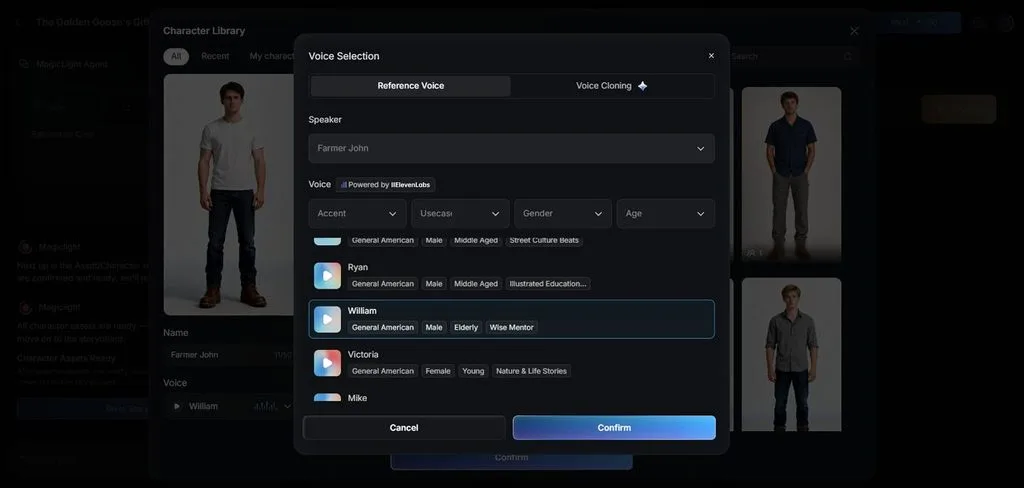
- Built-In Voices: The voice library includes 37 options for matching different characters, moods, or stories. Voice cloning works alongside 11 narration languages for flexible audio creation across projects.
- Shot-Level Storyboard Control: Outfits, poses, and facial expressions remain editable at the individual shot level before rendering. Instead of rebuilding entire clips, creators can adjust specific visual details when needed.
- Wide Style Range: More than 50 presets cover anime, 3D cartoon, and realistic looks for varied projects. Different visual choices make stories suitable for entertainment, education, marketing, or social content.
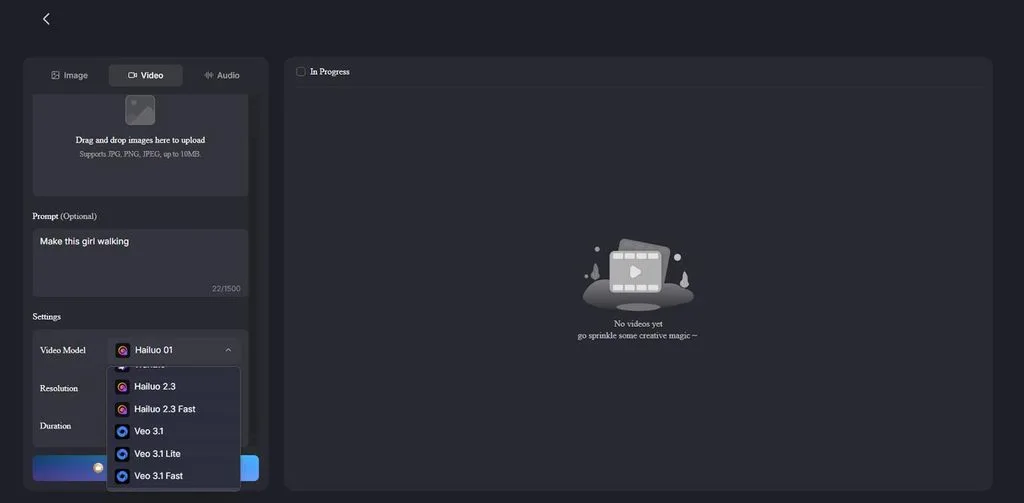
- 20 AI Video Models: Rendering can use 20 AI video models from several major model families available. Kling, Veo, Hailuo, Wan, and Seedance give creators more choices for different generation needs.
- Story Models: Creators can access 14 story models for developing scripts, scenes, or complete narratives. Available options include GPT-5.6 alongside GPT-6 Astra for different creative writing workflows.
How to Create a Complete AI Video With MagicLight AI
MagicLight AI turns a simple idea into a complete video with multiple connected scenes. Follow the steps below to create your story, customize scenes, then generate:
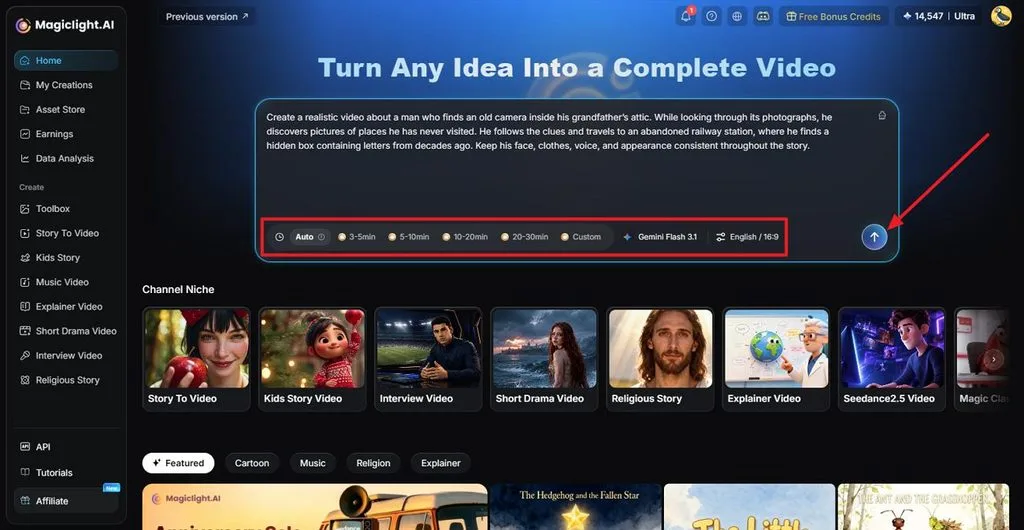
Step 1. Start With Your Video Idea
Write a short description of the story you want to create inside MagicLight AI. Select Duration, Model, Language, plus Aspect Ratio before sending your idea for processing.
Step 2. Shape the Story Before Production
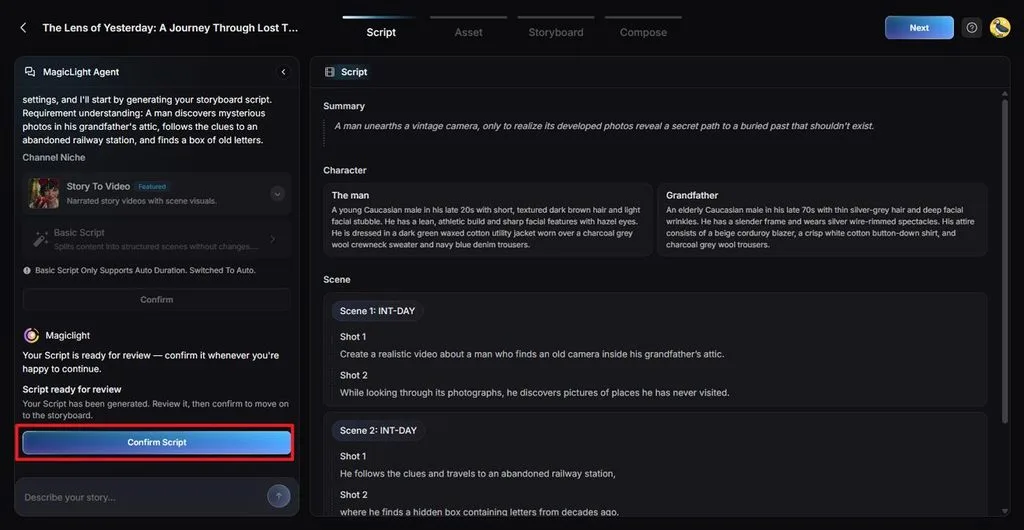
Read the generated story summary to see how MagicLight Agent develops your original idea. Make any necessary edits, then click Confirm Script to continue with your video.
Step 3. Give the Video Its Look
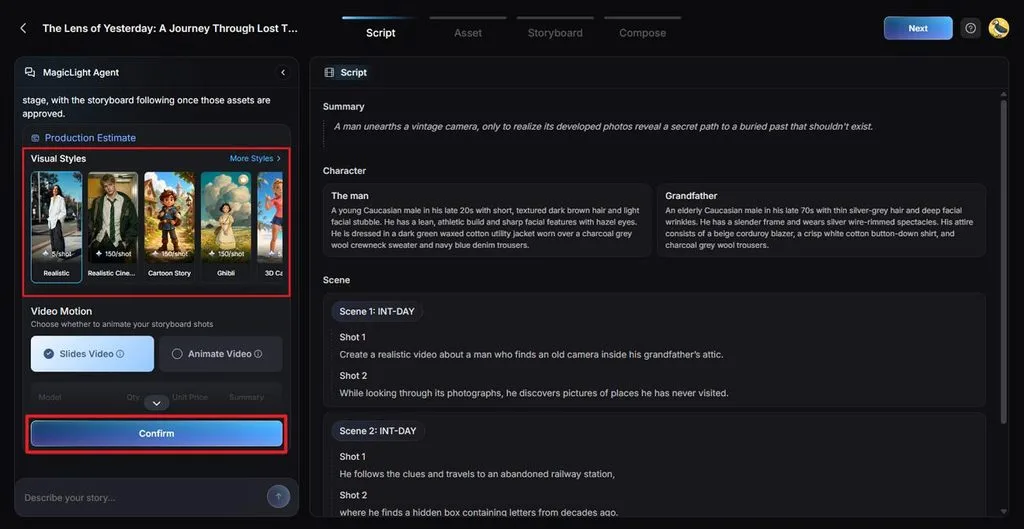
Browse Visual Style choices to decide how your scenes should appear throughout the story. Pick the option matching your concept, then use Confirm to carry that look forward.
Step 4. Choose Your Character
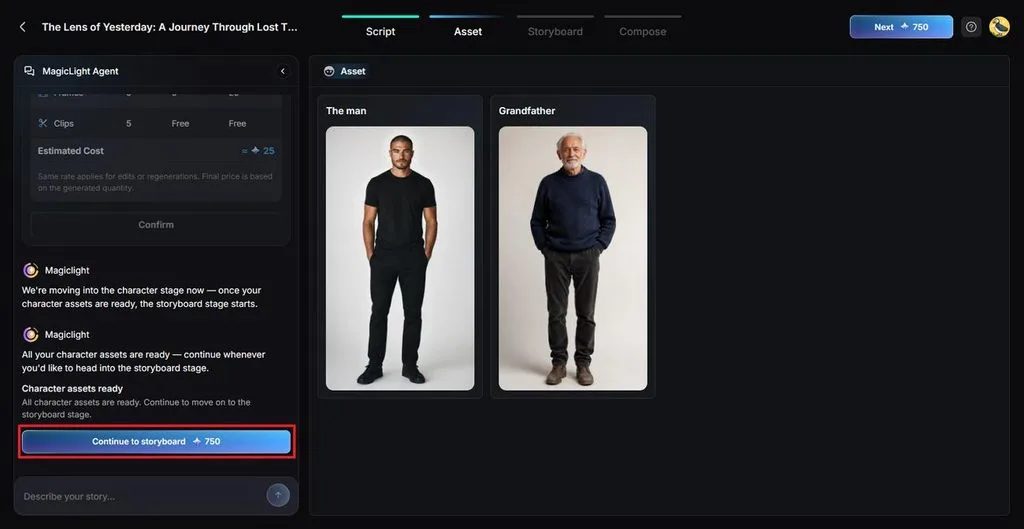
Select a character from the options created by MagicLight AI for your story. Choose your preferred option, then click Continue to Storyboard to move forward.
Step 5. Fine-Tune Every Storyboard Shot
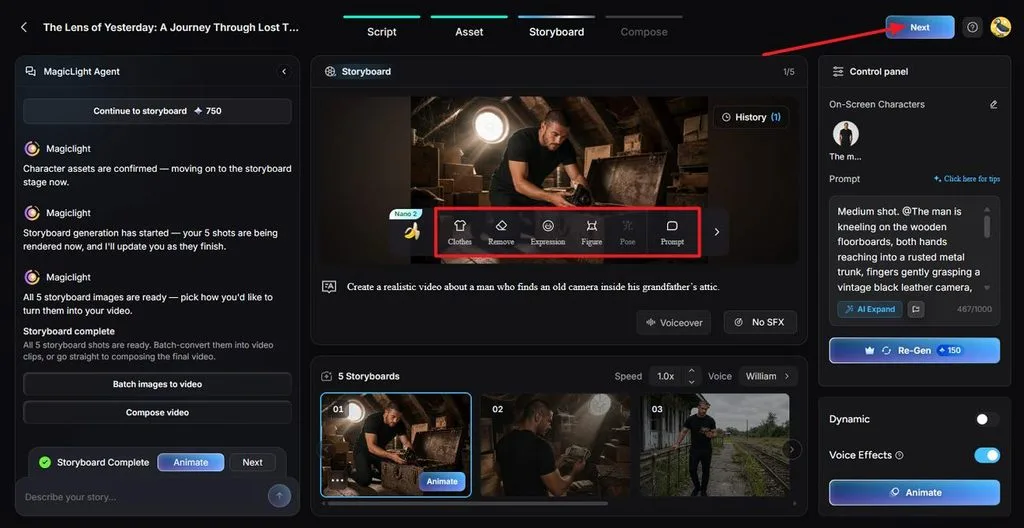
Inside the storyboard, open any scene that needs visual or performance changes. Clothes, Expression, Figure, Pose, plus Prompt controls let you shape individual shots before moving ahead. After that, press Next.
Step 6. Finish the Presentation
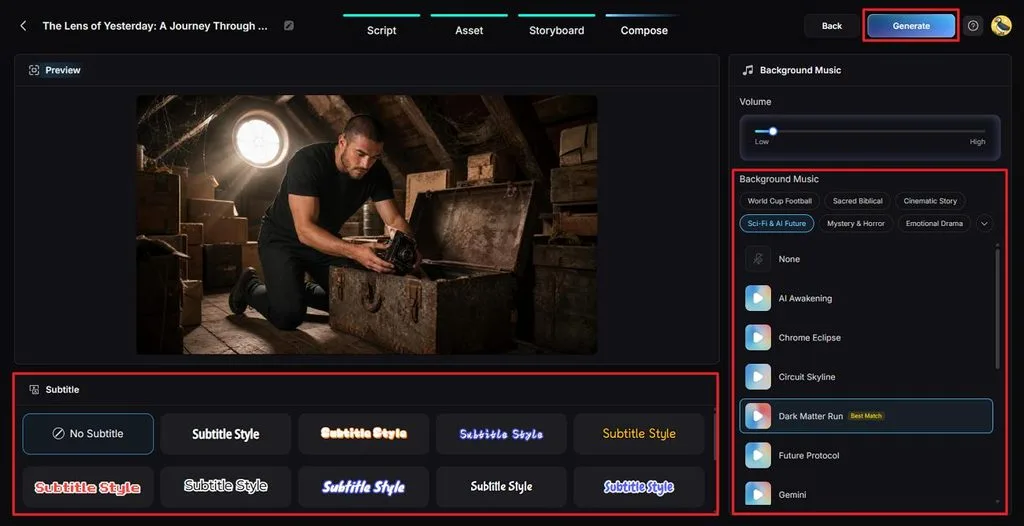
Choose a Subtitle Style for onscreen text if your video has text. Set your Background Music volume, preview these choices, then use Generate for final rendering.
Step 7. Save the Completed Project
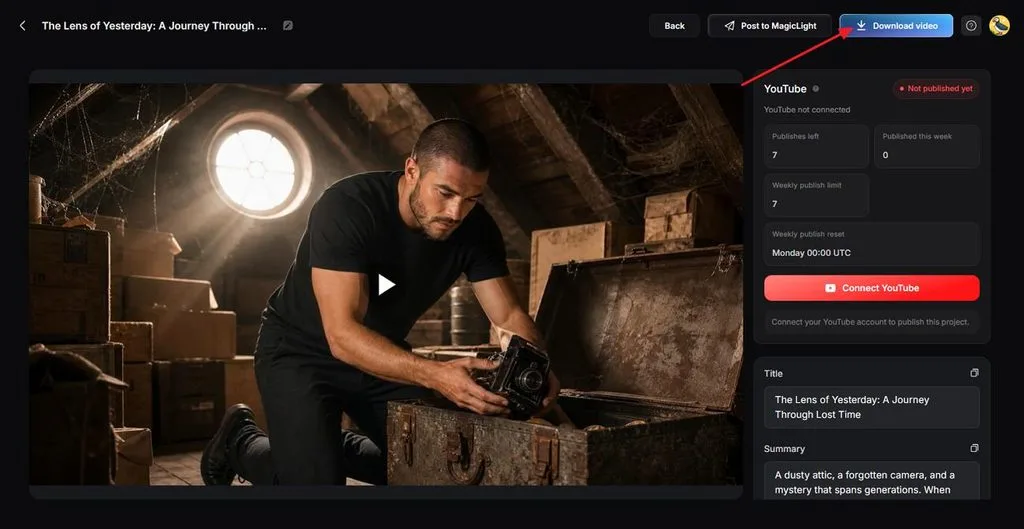
Play the finished result from beginning to end, checking its visual flow, sound, plus captions. Fix any scene that needs improvement or select Download video when the project is ready.
OmniHuman AI vs. MagicLight AI
Omni Human AI creates realistic character performances, while MagicLight AI supports complete video production. Review the table below to compare their main features, workflows, pricing, and creative options:
| Feature | OmniHuman AI | MagicLight AI |
| Main Purpose | Animating one image with a voice track | Producing complete videos from an idea or script |
| Required Inputs | A photo, audio file, and optional text prompt | A brief or script of up to 12,000 characters |
| Output per Run | One continuous clip, reaching 60 seconds on fal.ai | Multi-scene projects reaching 50 minutes on paid plans |
| Where It Runs | Dreamina, BytePlus, and fal.ai | Web browser, iOS, and Android apps |
| Free Access | Dreamina offers daily free credits | Sign-up credits with no card required |
| Paid Pricing | 0.12-0.16/second through supported APIs | Plans from $7.50/month with annual billing |
| Commercial Use | Depends on each platform's terms | Commercial license available with paid plans |
Conclusion
To conclude, OmniHuman AI creates natural talking avatars from one photo with matching audio tracks. Version 1.5 adds prompts and multi-speaker scenes while keeping each generation focused on one shot. MagicLight AI can create a character and keep it consistent across connected story scenes easily. Creators needing longer scripted projects can build complete videos with greater scene control there instead.
Frequently Asked Questions
- What is OmniHuman AI used for?
OmniHuman AI turns photos into realistic videos of characters talking or singing naturally. Creators use it for ads, social clips, music videos, pets, and cartoons. Version 1.5 also supports conversations between multiple characters within the same generated scene.
- Is OmniHuman AI free to use?
OmniHuman AI free access is available through platforms offering limited generation credits. Dreamina provides 120 daily credits for creating avatar videos without immediate payment. BytePlus charges $0.12/second, while fal.ai charges $0.16/second for generated videos.
- Can OmniHuman AI turn a photo into a talking video?
One photo with audio can create a talking character with synchronized movements. Clear source images help produce better facial expressions, gestures, and lip movements. Dreamina can also create spoken dialogue directly from a written script.
- What is the difference between OmniHuman 1.0 and 1.5?
OmniHuman 1.0 mainly uses audio signals to guide character movements and expressions. Version 1.5 adds better speech understanding for more meaningful character actions. It also supports text prompts, multiple speakers, and longer generated videos.
- What is a good alternative to OmniHuman AI for creating complete AI videos?
MagicLight AI creates complete videos from simple ideas, scripts, or longer stories. Story to Video builds connected scenes while keeping recurring characters visually consistent. Paid projects can reach 50 minutes to create longer multi-scene video stories.



![How to Remove People from Photos in 2026 [Full Guide]](https://magiclight.ai/wp-2/wp-content/uploads/remove-people-from-photos-guide.jpg-300x197.webp)
![6 Best Picture Modification Apps in 2026 to Try [New List]](https://magiclight.ai/wp-2/wp-content/uploads/best-picture-modification-apps-for-photos.jpg-300x200.webp)