UGC videos help brands promote products through natural content that fits popular social platforms. Hiring creators for every product video can quickly increase marketing costs for smaller brands. The top affordable tools for UGC video marketing provide easier ways to create content.
Some tools generate AI presenters, while others help edit footage recorded by real creators. Choosing the right tool depends on pricing, video quality, features, and commercial usage rights. This guide compares affordable UGC video tools to help brands choose the right option.
Part 1. What to Look for in Affordable UGC Video Tools
Affordable UGC tools can lower production costs without making branded videos look noticeably cheaper. The right choice should also fit how your brand plans to use videos. Keep these points in mind when comparing affordable UGC video tools:
- Believable Presenters: AI presenters should look natural enough to fit creator-style marketing content comfortably.
- Feed-Native Format: Vertical video support helps your content fit TikTok and Reels without resizing.
- True Cost: Check what each plan actually lets you create before paying for it.
- Ad Usage Rights: Paid advertising requires commercial rights, not just permission to download videos.
- Honest Disclosure: AI presenters should never be passed off as customers who bought products.
Part 2. 6 Top Affordable Tools for UGC Video Marketing
The top affordable tools for UGC video marketing give brands different ways to work. Below are the 6 tools that offer useful options without demanding a large budget. Each one handles UGC creation differently, depending on the content you already have available.
1. MagicLight AI
Best For: Small brands creating regular UGC ads affordably.
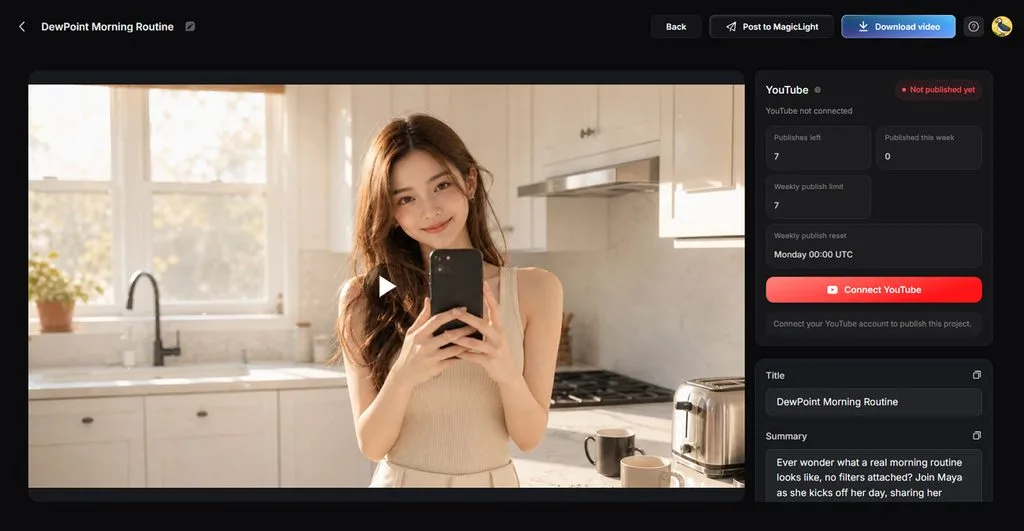
Brands often need several short ads before sending product samples to individual content creators. MagicLight AI creates these videos using brand materials that companies may already have available. A product photo or written script can provide enough material to begin creating videos.
Finished videos can feature a speaking presenter with captions ready for short marketing campaigns. Testing different hooks becomes easier because brands can simply change the script between versions. This approach saves brands from arranging another creator shoot whenever campaign messaging needs changes.
Key Features
- MagicLight Agent: Product details help shape suitable angles for UGC marketing video campaigns. Scripts then provide a useful starting point for testing different messages.
- AI Character Generator: Build custom brand characters using descriptions reaching up to 1,000 characters. Uploaded pictures guide their appearance, while finished characters remain available for reuse.
- Longer Scripts: Add scripts reaching 12,000 characters for detailed UGC advertising campaigns and messaging. Extra script space helps cover product details without cutting important selling points.
- Image to Video: Upload up to 5 reference images for one UGC video. Generated videos can run up to 30 seconds for short advertising campaigns.
- Voices and Captions: Choose from 37 voices to match narration with different UGC campaign styles. Add captions using 16 subtitle designs for viewers watching without sound.
Pros
- The MagicLight Agent helps determine the niche nature of the video instantly.
- Its Image-to-Video facility is backed by 20 different AI video models of different families.
- Freely create videos of different aspect ratios, from horizontal to vertical options.
Cons
- Does not offer video exports greater than 1080p.
2. CapCut
Best For: TikTok sellers producing frequent creator-style product ads.
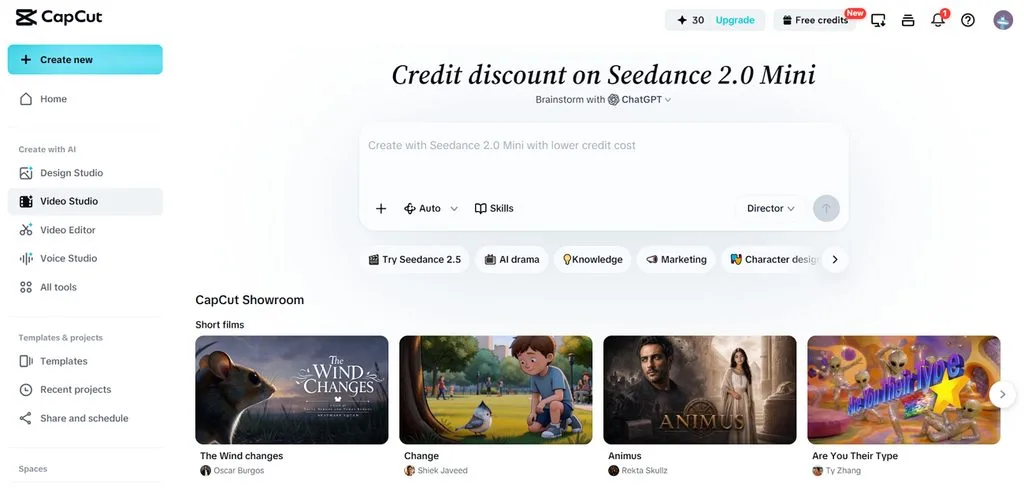
Among top affordable tools for UGC video marketing, CapCut turns scripts into creator-style advertisements. Its avatar workflow pairs spoken scripts with presenters for product-focused social campaigns online. Uploaded product media can replace stock footage when brands need more accurate visuals onscreen.
Key Features
- AI avatars can deliver written scripts in creator-style product advertisements without filming.
- Smart media matching aligns uploaded product clips with relevant script sections automatically.
- Scene controls let marketers swap visuals, voiceovers, or generated media after creation.
Pros
- Uploaded product media can replace mismatched stock footage.
- Direct TikTok publishing shortens the final posting process.
Cons
- Commercial projects require careful checks on licensed assets.
- Generated drafts can still need manual scene corrections.
3. Canva
Best For: Brands repurposing customer footage across social channels.
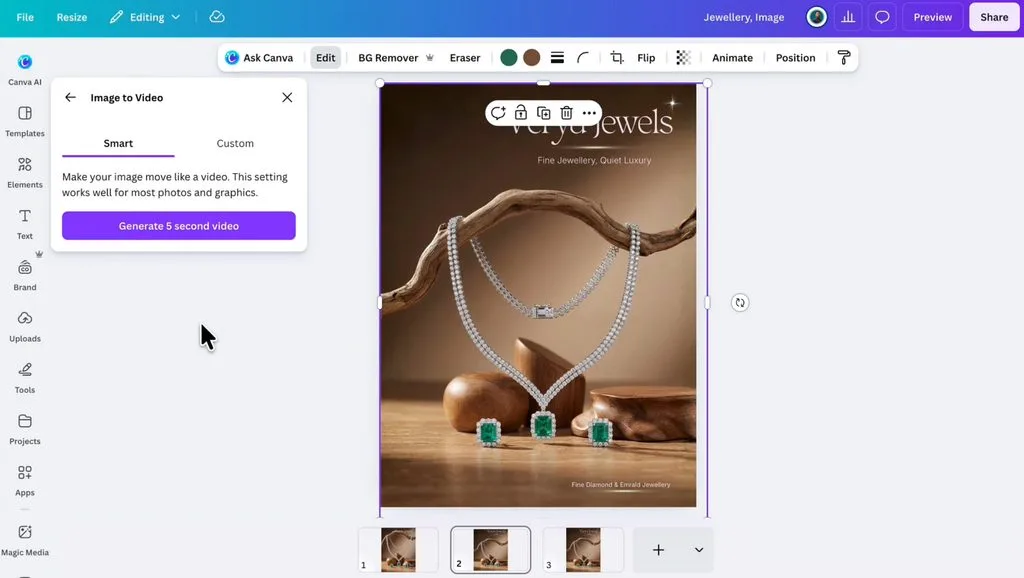
Creator footage becomes easier to repurpose when one workspace handles several social formats. Canva turns uploaded customer clips into polished videos for branded social campaigns quite easily. This approach fits brands already receiving authentic footage from customers or freelance creators regularly.
Key Features
- Highlights pulls strong moments from longer creator footage into shorter usable clips.
- Background Remover clears distracting scenes from creator videos without requiring green screens.
- Caption translation adapts spoken UGC messages for audiences across 100+ supported languages.
Pros
- Caption styling offers more than 20 preset packs.
- Background removal works directly on uploaded creator footage.
Cons
- Video background removal only handles clips under 10 minutes.
- Background Remover access requires a paid Canva plan.
4. Adobe Express
Best For: TikTok advertisers needing commercially cleared trending music.
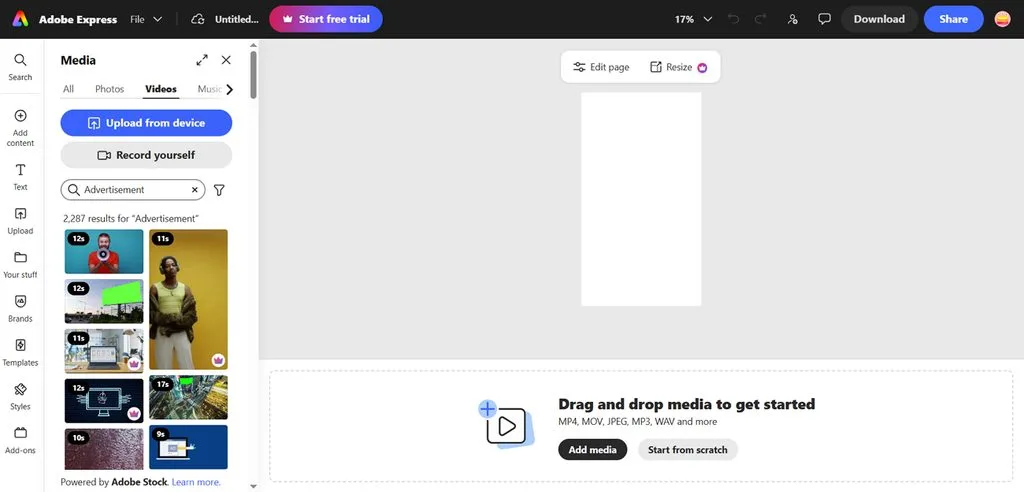
Adobe Express gives video marketing software users direct access to TikTok's commercial music library. Its Symphony integration helps advertisers pair short product videos with music cleared for TikTok. Brands can also prepare vertical ad creatives and send them toward TikTok Ads Manager.
Key Features
- TikTok Symphony provides access to 1M+ commercially cleared songs and sounds for advertisers.
- Image to Video turns static product pictures into 5-second TikTok-ready moving ad clips.
- Safe Zone helps position important ad elements within platform-friendly areas before publishing.
Pros
- Commercial Music Library reduces licensing concerns for TikTok.
- TikTok ads can move directly toward Ads Manager.
Cons
- Symphony Assistant currently works on desktop web only.
- TikTok Ads Manager accepts videos up to 60 seconds.
5. InVideo
Best For: Performance marketers testing multiple UGC ad variations.
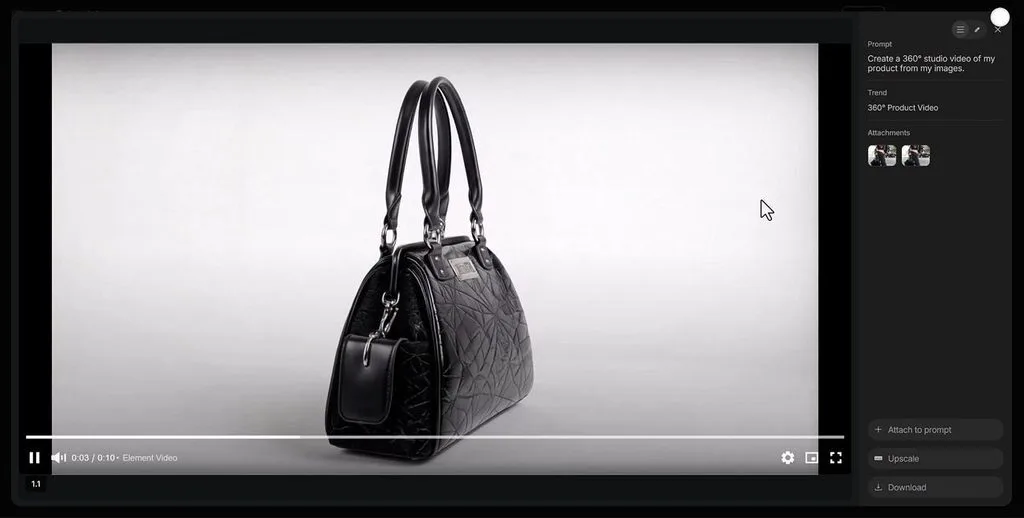
Product links can become complete UGC ads without arranging separate shoots for every variation. Among the top affordable tools for UGC video marketing, InVideo focuses heavily on creative testing. Marketers can change faces or openings while keeping the same product consistent across campaigns.
Key Features
- Each shot appears as a still for approval before animation begins afterward.
- Creator casting locks one face and voice consistently across different advertisement shots.
- Winning advertisements can be rebuilt for new markets using locally matched creators.
Pros
- Product packaging stays consistent throughout different generated advertisements.
- Multiple agents can build separate ads simultaneously.
Cons
- Free exports include InVideo branding on generated videos.
- Free generation credits reset weekly instead of monthly.
6. VEED
Best For: Brands mixing avatar ads with product footage.
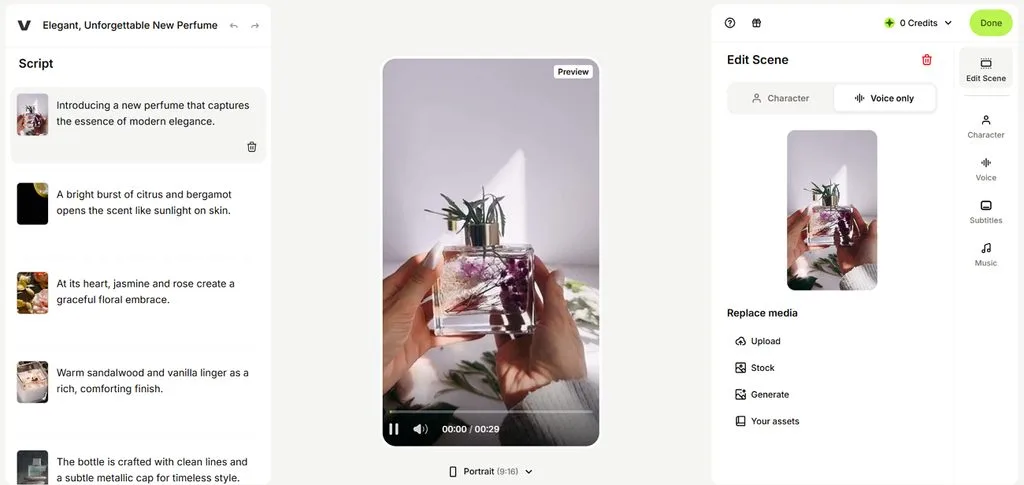
VEED turns still presenter images into speaking UGC ads using recorded or generated voices. Its top affordable tools for UGC video marketing also include ready-made UGC avatars. Marketers can finish generated ads inside the editor with their actual product footage afterward.
Key Features
- Fabric 1.0 makes uploaded spokesperson or mascot images speak using chosen voices naturally.
- UGC avatars offer multiple camera angles for less repetitive presenter footage across scenes.
- Veo 3.1 and Hailuo 2.3 can replace footage with custom-generated visuals afterward.
Pros
- Generated UGC opens directly inside VEED's full editor.
- Product footage can blend with generated avatar content.
Cons
- Some UGC avatars offer camera-angle choices, not all.
- Generative video features consume credits during repeated testing.
Compare All Affordable UGC Video Tools
Free plans can look affordable until watermarks or export limits affect regular campaign use. AI credits can also increase costs when brands create several versions for testing purposes. The table below compares each tool to show where your marketing budget actually goes:
| Tool | UGC Creation Method | Max AI Video Length | Max Export Resolution |
| MagicLight AI | AI characters, scripted UGC ads | Up to 50 min | 1080p |
| CapCut | AI avatars, product media, creator editing | Varies by AI workflow | Up to 4K |
| Canva | Creator footage editing, AI-generated clips | Up to 8 sec per AI clip | High-resolution MP4 |
| Adobe Express | Templates, AI clips, TikTok ad creation | 5 sec AI clips | Up to 1080p for common social workflows |
| InVideo | AI creators, product-link UGC ads | Varies by generated ad | Up to 1080p on supported plans |
| VEED | UGC avatars, talking images, video editing | Varies by AI model | Up to 4K |
Part 3. Why Choose MagicLight AI for UGC Video Marketing
MagicLight AI stands among the top affordable tools for UGC video marketing through flexible creation options. Brands can test different presenters and messages without arranging new creator shoots every time again. Below are the main reasons MagicLight AI works well for regular UGC marketing campaigns:
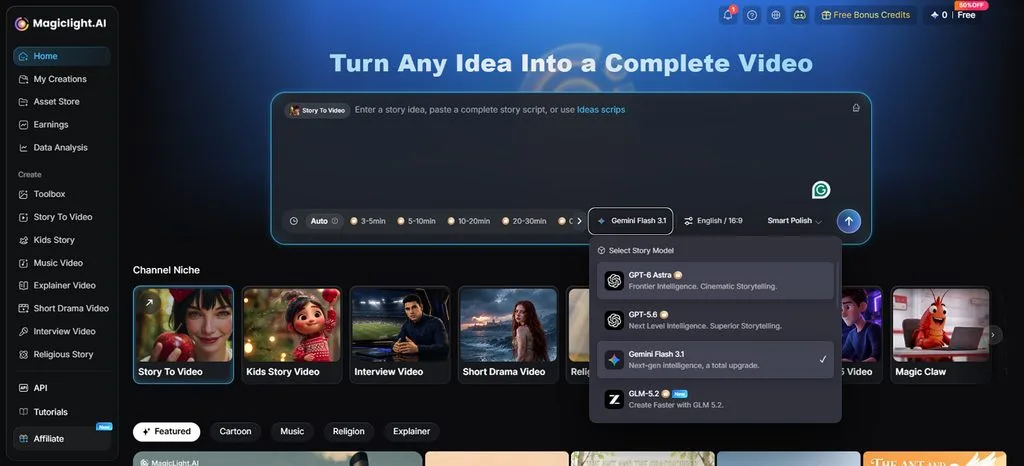
- Story Models: Access 14 models for creating UGC scripts with different campaign directions. Options include GPT-6 Astra, GPT-5.6, and Gemini Flash 3.1 for marketing content.
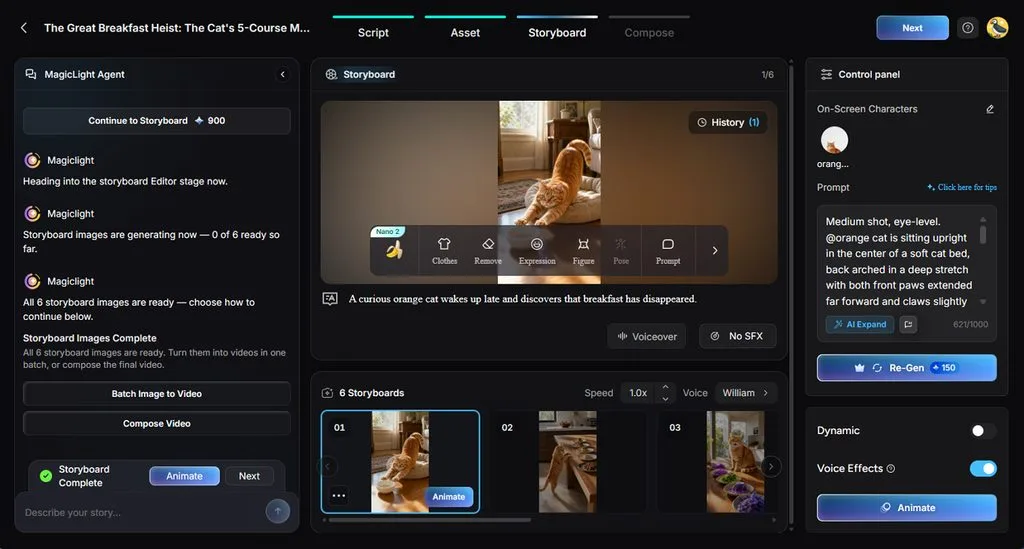
- Nano Storyboard: Nano Storyboard splits UGC scripts into scenes for review before video generation. Creators can adjust individual shots and select from 50 poses for characters.
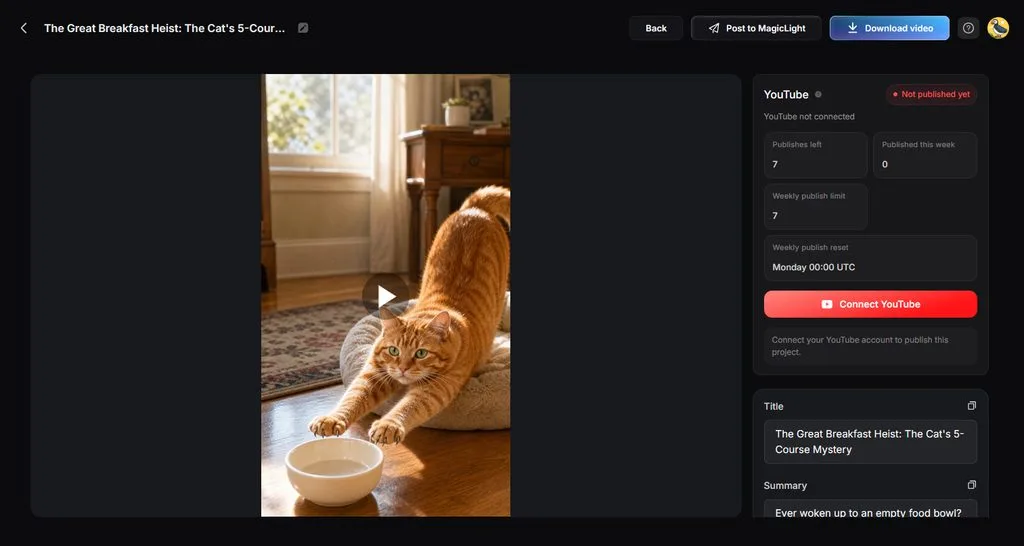
- Channel-Ready Formats: Turn one UGC concept into vertical content suited across major social platforms. Create widescreen versions when the campaign also needs longer YouTube video placements.
- Rights for Paid Ads: Paid plans include commercial rights for using generated videos in advertisements. Watermark removal also keeps 1080p exports clean for branded UGC marketing campaigns.
Guide for Creating a UGC Marketing Video With MagicLight AI
MagicLight AI makes creating UGC marketing videos simple with its guided video creation process. Follow the steps below to create a marketing video for your campaign:
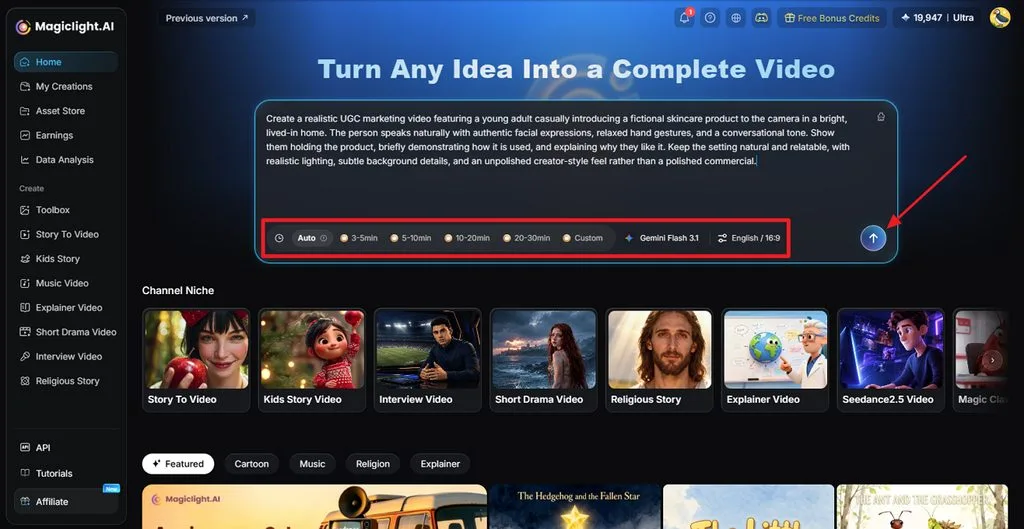
Step 1. Paste Your UGC Marketing Script
Once you open MagicLight AI, paste your UGC marketing video script. Set the video duration and aspect ratio. After that, press the Send button to continue.
Step 2. Review Your UGC Script
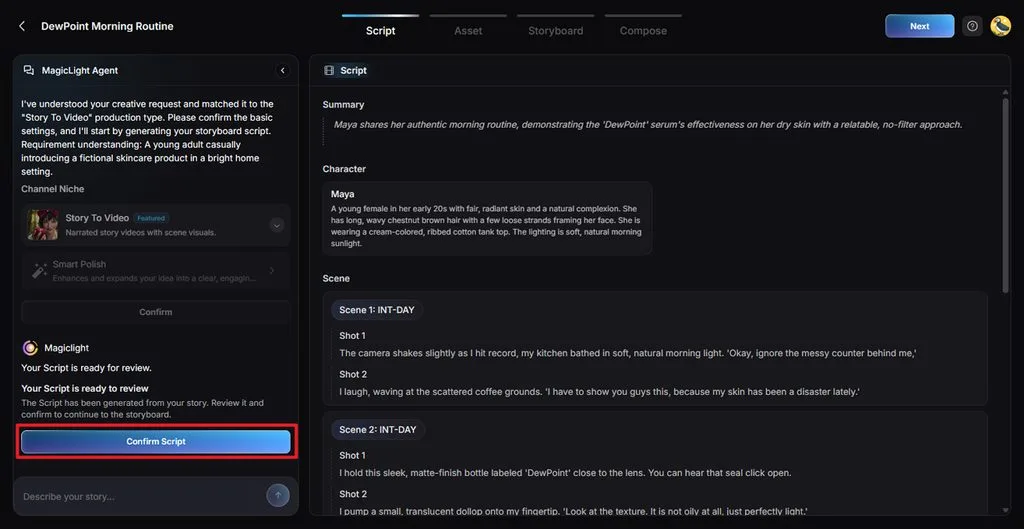
After the MagicLight Agent provides a Summary, Scenes, and Shots, review each scene and make any mandatory amendments. Once done, press Confirm Script to move forward.
Step 3. Pick a Visual Style for the Video
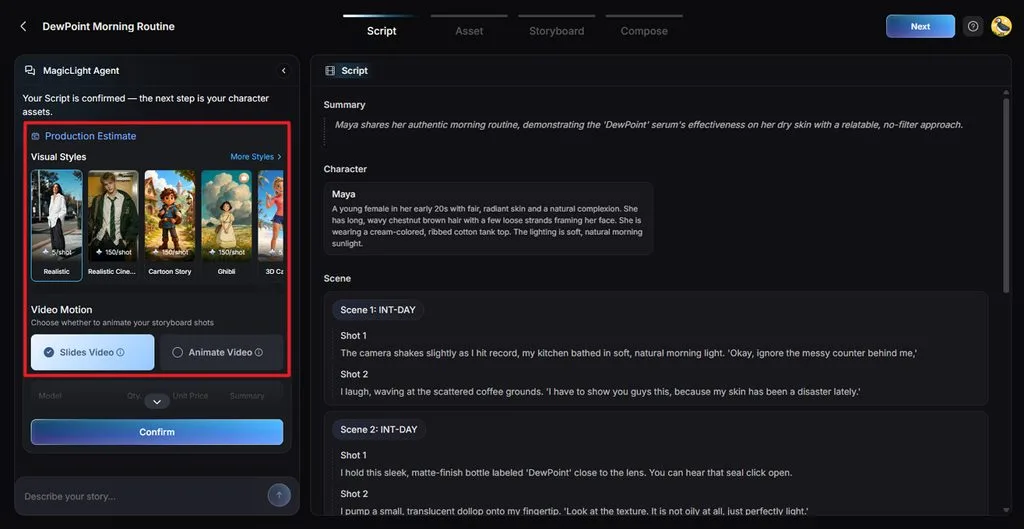
Next, choose a Visual Style that fits the natural look you want. Pick a suitable Video Motion and confirm your choices.
Step 4. Choose a UGC Video Character
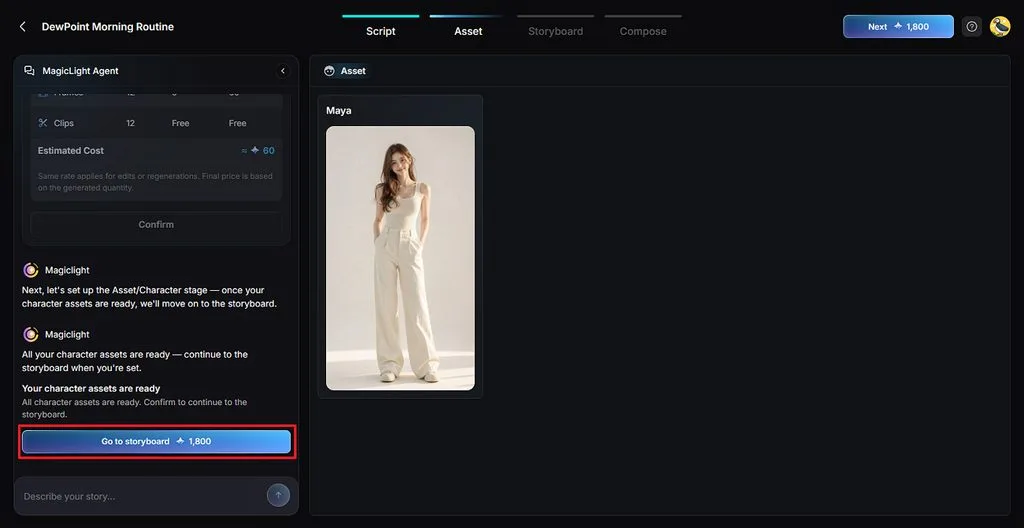
Then, check the generated character based on your UGC video script. Click the character if you want any amendments and press the Go to Storyboard option to move forward.
Step 5. Refine the UGC Storyboard
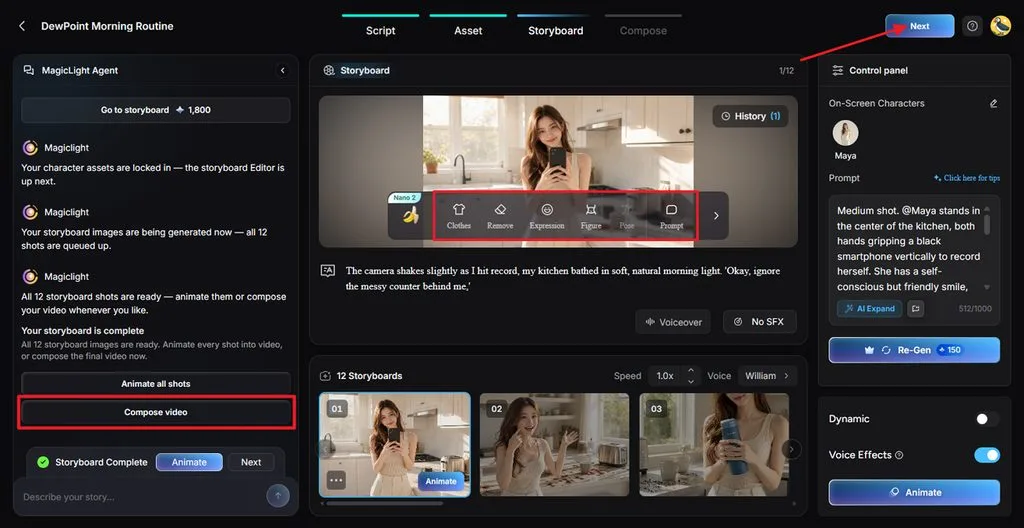
In Nano Storyboard, review each scene and use the Clothes, Expression, or Pose options to change any scene. You can change voices and effects before selecting Compose video. Once all is done, press Next to continue with the creation.
Step 6. Add Subtitles and Music
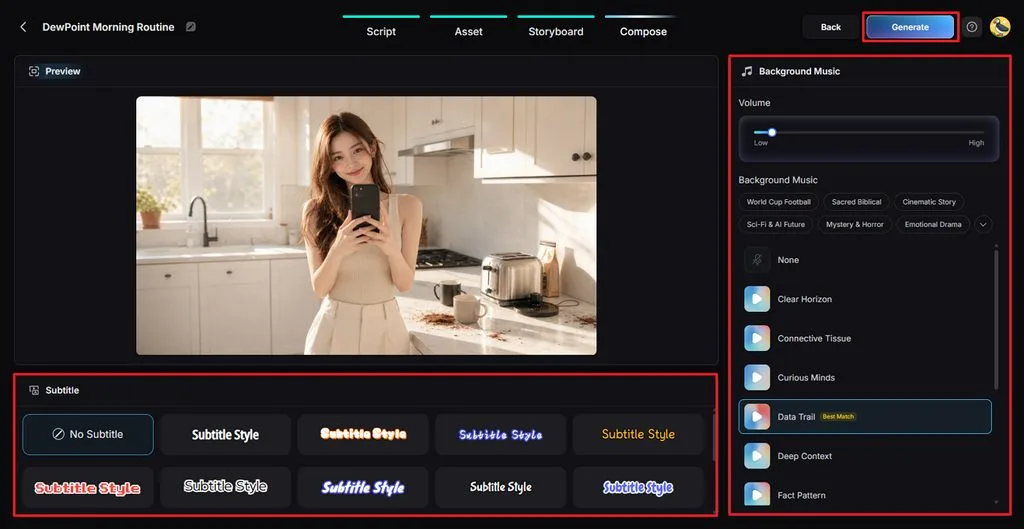
Choose a Subtitle Style, or select No Subtitle if your video has no voice. Adjust the background music and volume. Next, click Generate to create the final video.
Step 7. Download Your UGC Video
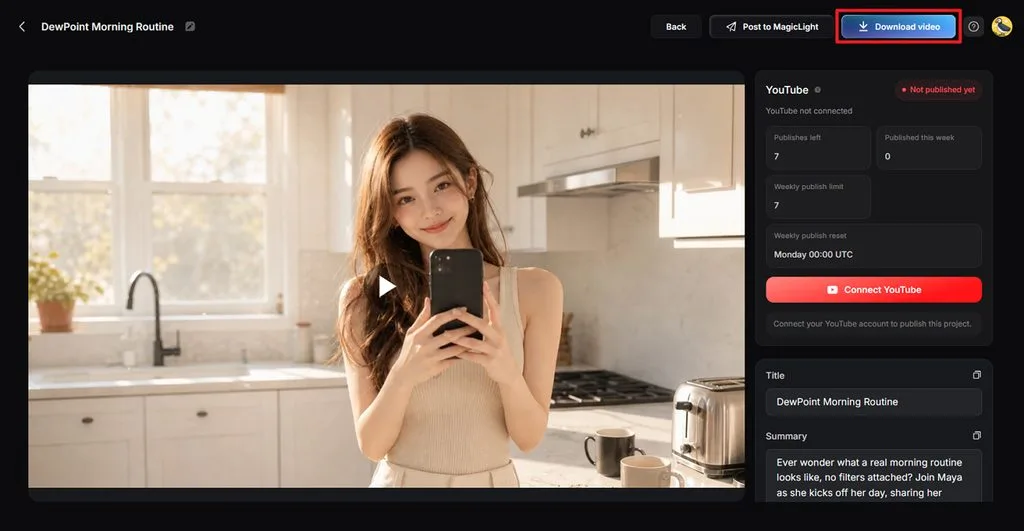
Watch the generated video and check the scenes, voice, subtitles, music, and flow. Click Download video to save the finished UGC content for your marketing channels.
Conclusion
In conclusion, top affordable tools for UGC video marketing give brands more creation flexibility options. Canva and CapCut help brands edit creator content and prepare videos for social campaigns. InVideo, VEED, and Adobe Express provide different AI features for producing promotional video content. MagicLight AI combines UGC creation features with flexible tools for regular brand marketing campaigns.
FAQs on Affordable UGC Video Marketing Tools
1. What benefits can affordable UGC video tools bring to small brands?
Affordable UGC tools help small brands create videos without expensive creator shoots. They simplify captions, vertical formatting, and editing tasks for regular social campaigns. Brands can test more messages while keeping monthly content production costs manageable.
2. What should I look for in a budget UGC video tool?
Look for clear pricing, commercial usage rights, and watermark-free exports before choosing. Check vertical video support, captions, and available AI features for campaign needs. Free plans also help test output quality before paying for regular use.
3. Can AI-generated UGC videos run on TikTok and Meta ads?
Yes. AI-generated UGC videos can be used in paid campaigns on TikTok and Meta, subject to their advertising and AI-content requirements. MagicLight AI helps create UGC-style videos with AI-generated visuals, characters, voices, and scripts for ad testing.
4. Is producing UGC videos with AI cheaper than hiring real creators?
AI UGC can be more cost-effective because you can create multiple variations without paying creators for each version. MagicLight AI lets brands generate different scripts, characters, voices, and video concepts in one workflow. Actual savings depend on production volume and campaign requirements.
5. Which affordable AI tool creates authentic UGC-style marketing videos?
MagicLight AI provides several tools for creating natural creator-style videos for marketing. Brands can build characters, prepare scripts, and create social-ready promotional video content. Its flexible workflow suits brands producing regular UGC variations for different campaigns.



![How to Remove People from Photos in 2026 [Full Guide]](https://magiclight.ai/wp-2/wp-content/uploads/remove-people-from-photos-guide.jpg-300x197.webp)
![6 Best Picture Modification Apps in 2026 to Try [New List]](https://magiclight.ai/wp-2/wp-content/uploads/best-picture-modification-apps-for-photos.jpg-300x200.webp)