TikTok gives creators a simple way to share short videos with people around the world. These videos can cover stories, tutorials, entertainment, and many other creative ideas online. Creating good content does not require expensive cameras, complex software, or professional editing skills either.
A clear topic with a short script can make the entire video creation process easier. You can record through TikTok or use MagicLight AI to turn scripts into videos. This guide explains how to create a TikTok video using easy steps for beginners.
Part 1. How to Plan Your TikTok Video
Good planning makes the video creation process simpler before you start creating. The 3 planning steps shared below help you prepare your topic, script, and video style:
- Choose a Topic
Start with one topic people can understand without much explanation. “Cooking,” for example, is quite broad. Something like “five-minute breakfast ideas” gives you a much clearer direction for the video. You can find useful topic ideas from these 4 common sources:
- Personal Know-How: Everyday experience is often enough for a TikTok idea. Cooking the same quick breakfast every morning or finding an easier way to finish a task can both become useful videos.
- Viewer Questions: Read comments on similar videos to see what people still want explained.
- Trends With a Twist: Use popular sounds or hashtags while bringing your own angle to them.
- Series Ideas: Pick a format you can continue, such as “Day 1 of learning guitar.”
- Write a Simple Script
A short script helps you make a TikTok video without sounding too rehearsed. Look at the table below for a simple three-part structure you can follow:
| Part | Timing | What It Does | Example |
| Hook | First 3 seconds | States the payoff or problem right away | “This $5 fix stopped my sink from leaking.” |
| Body | Middle | Delivers the tip, story, or steps in order | Three quick steps, one per shot |
| Ending | Last few seconds | Gives a reason to comment, follow, or rewatch | “Which tip should I test next?” |
- Pick a Video Style
Your video style should fit the topic, footage available, and your comfort level on camera. Below are the 5 common video styles beginners can use when creating content for TikTok:
- Talking to Camera: Speak directly to the camera with the person remaining the main focus. This format works well for opinions, stories, updates, and personal content.
- Voiceover With Visuals: Let narration carry the story while photos, screen recordings, or video clips appear on screen. You do not need to appear on camera.
- Tutorial or How To: Show a process clearly from start to finish. Recipes, craft projects, demonstrations, and quick tech fixes work naturally with this format.
- Duet or Stitch: Use Duet to place your video beside another creator’s video, or Stitch to combine part of an existing TikTok with your own response.
- Animated Story or Talking Character: MagicLight AI can create animated scenes, while its Lip Sync tool matches a character’s mouth movements with recorded or AI-generated speech.
Part 2. How to Create a TikTok Video With MagicLight AI
MagicLight AI offers a simple way to create TikTok videos without filming scenes. Its AI TikTok Video Generator turns written ideas into complete vertical videos with narration and captions. Anyone learning how to create a TikTok video can add a 12,000-character script for longer stories. MagicLight Agent prepares scripts, storyboards, characters, and visual direction before the video creation process begins.
Key Features of MagicLight AI
- Format Suggestions: MagicLight Agent suggests video formats that match the idea behind your content. You can choose Short Drama, Explainer, or Interview based on your video needs.
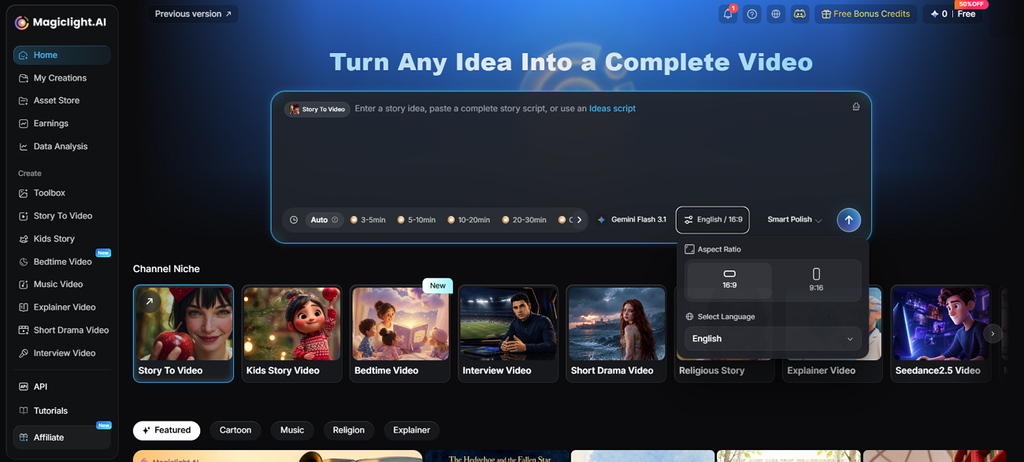
- Vertical 9:16 Framing: Set the 9:16 aspect ratio to prepare videos for TikTok screens properly. Every scene keeps the selected framing, reducing unwanted cropping during the final export.
- Series-Ready Characters: Save characters to keep the same appearance across different videos in your series. You can also upload reference images with prompts containing up to 1,000 characters.
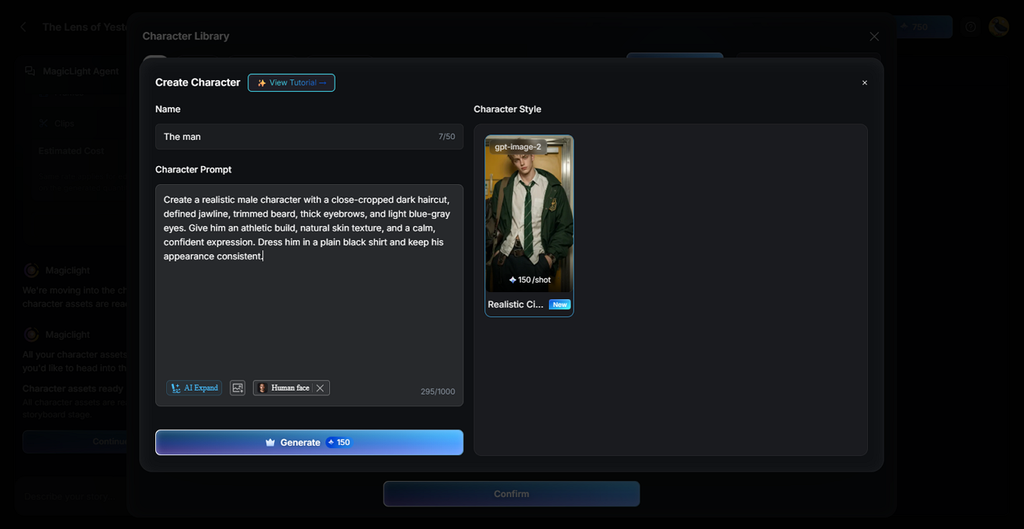
- Voices and Captions: Choose from 37 voices with voice cloning for narration that suits your video. Captions include 16 subtitle styles with support for content across 11 different languages.
- Post-Ready Extras: MagicLight AI suggests useful hashtags once your finished video is ready for posting. You can also create covers or thumbnails using 21 available cover template options.
Guide: How to Create a TikTok Video With MagicLight AI
Most “how to create TikTok video” tutorials start with a camera, but MagicLight AI starts with a written idea instead. The steps below show how to turn that written idea into a TikTok-ready video:
Step 1. Start With Your TikTok Idea
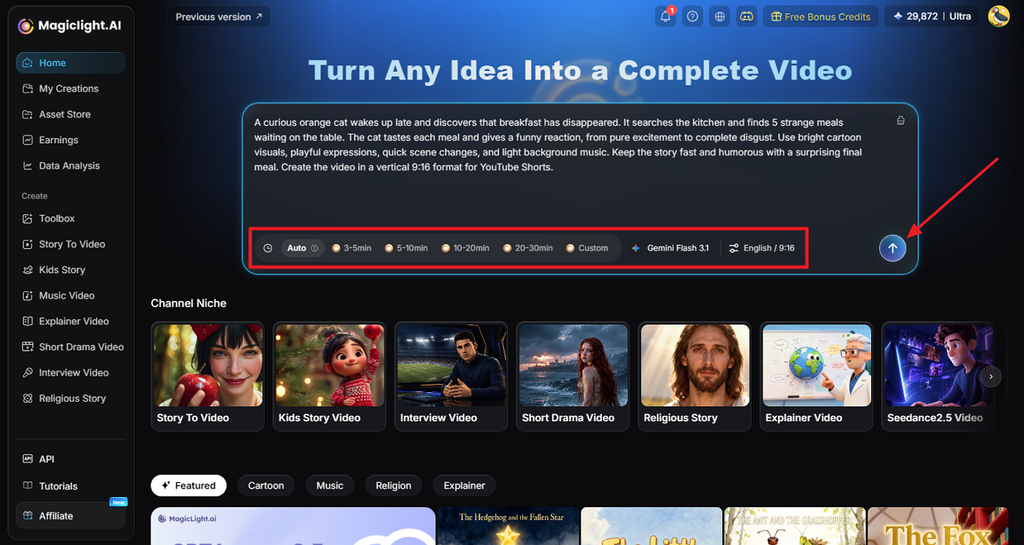
In MagicLight AI’s homepage, paste your TikTok script inside the text box. Next, select the Video Duration, model, Video Language, and 9:16 Aspect Ratio. Next, click Send to begin building the story.
Step 2. Check the Storyline
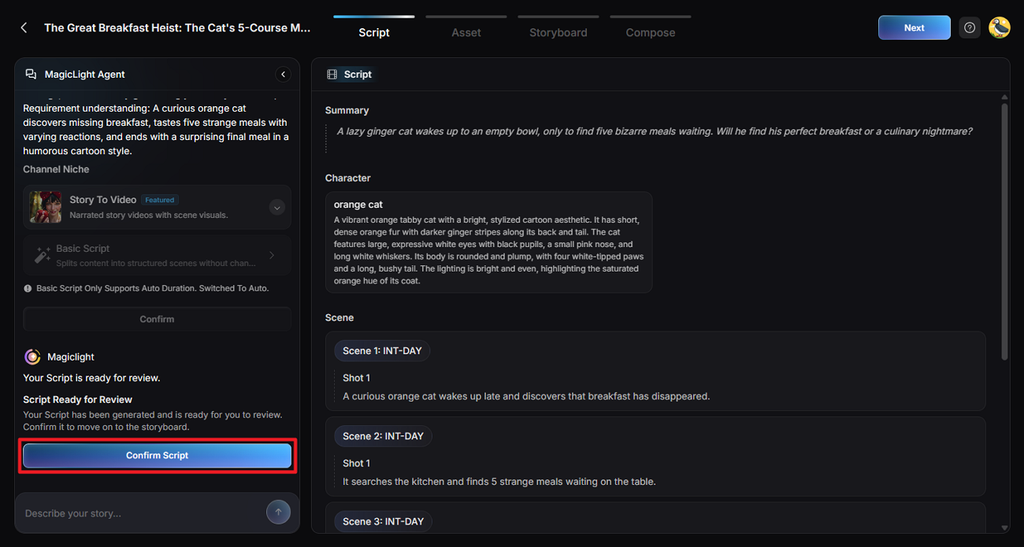
Review the video plan generated by MagicLight Agent before moving to the next stage. Read through the generated details and change anything that does not match your idea. Then, select Confirm Script to move ahead.
Step 3. Build the Video’s Appearance
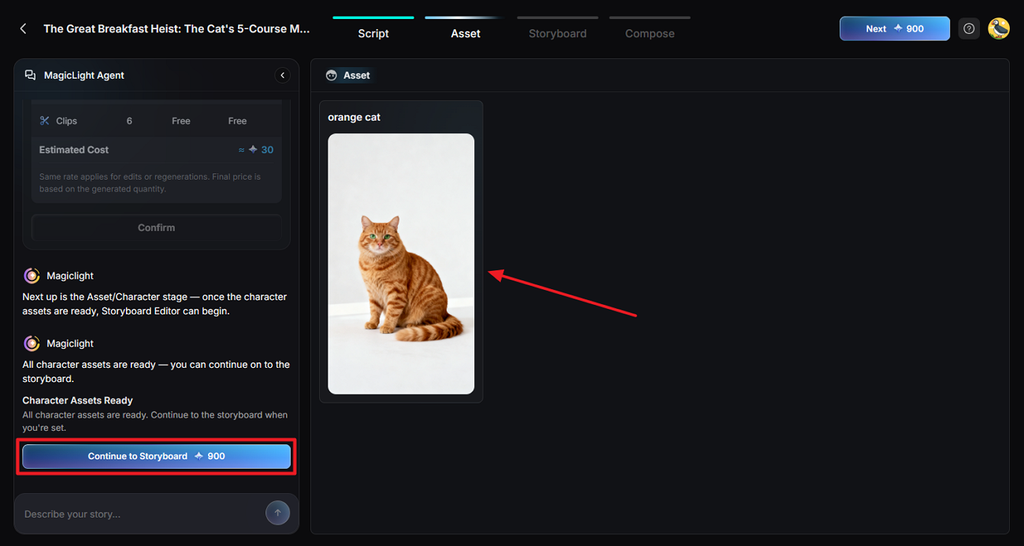
Choose a Visual Style that gives your TikTok the look you originally wanted. Review the characters suggested based on your video script and change any character details you dislike before selecting Continue to Storyboard for the next stage.
Step 4. Shape Each Storyboard Shot
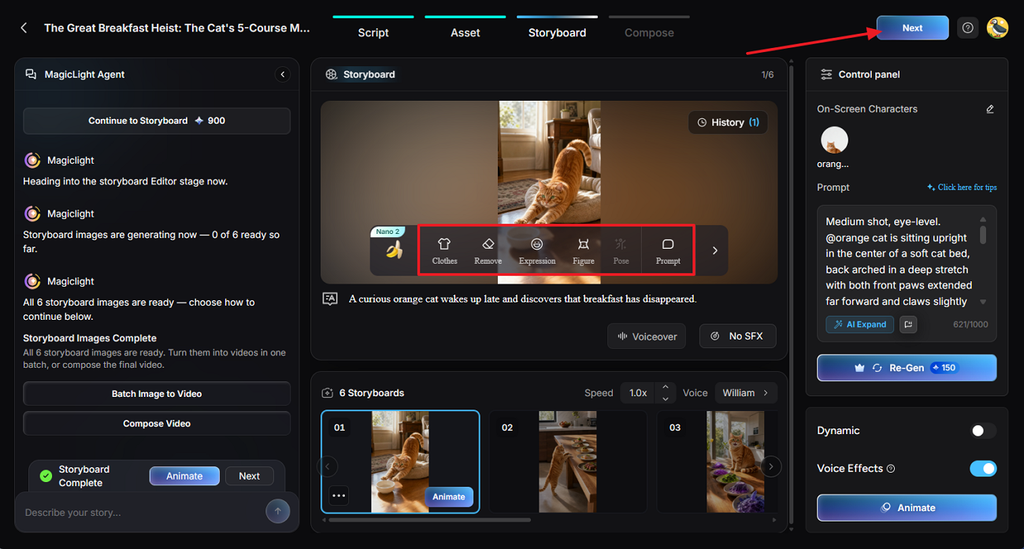
The Nano Storyboard lets you work on individual shots instead of changing everything together later. Update Clothes, Expression, Figure, Pose, or Prompt wherever a shot needs improvement visually. Once your storyboard looks right, click Next to continue.
Step 5. Prepare the Final Audio
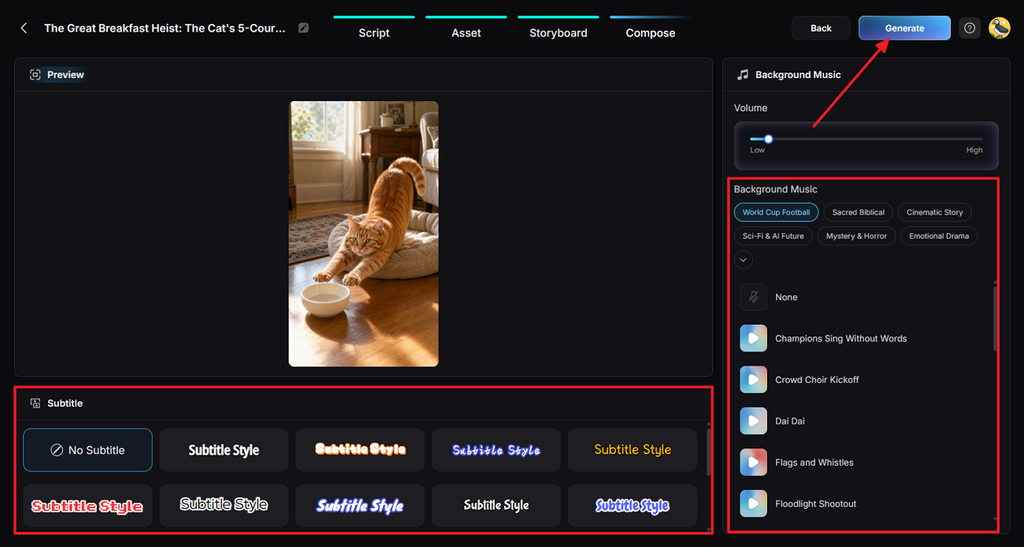
After that, choose a Subtitle Style for your video when your video has dialogue. Set the Background Music and volume, then select Generate to produce your finished video.
Step 6. Save Your TikTok Video
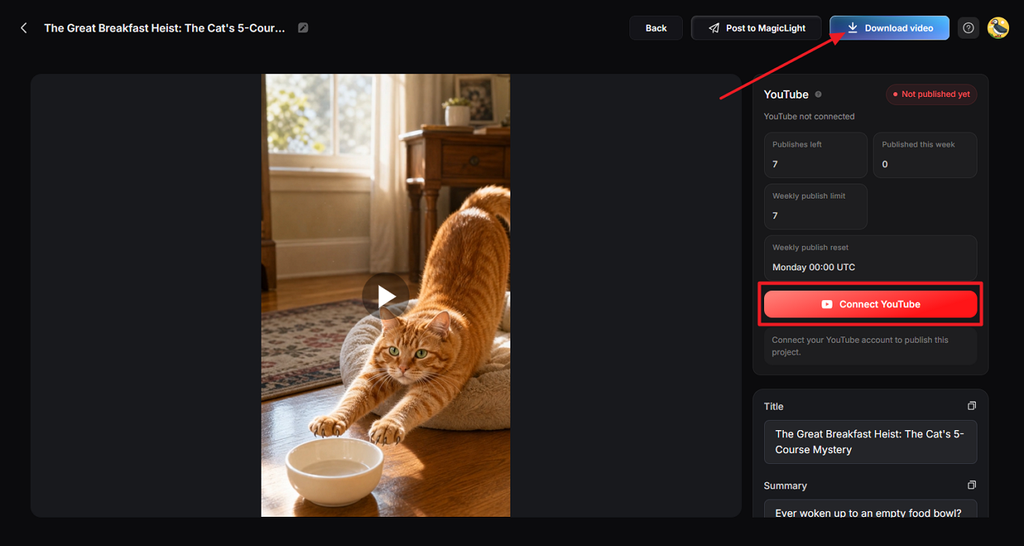
Play the completed result from the beginning and check whether the visuals, speech, captions, music, and pacing work well. If everything looks ready for TikTok, select Download video to save the finished file. Moving to a paid plan removes the watermark and raises downloads to 1080p.
Part 3. Tips for Better TikTok Videos
Understanding how to create TikTok videos becomes easier when you follow a few practical habits. These tips can help make your TikTok videos more engaging for viewers:
- Hook in Three Seconds: Give viewers something worth watching immediately before their attention moves toward another TikTok video.
- Shoot Vertical in HD: A 9:16 frame at 720p minimum gives TikTok videos a clean full-screen appearance.
- Mind the Safe Zone: Keep faces and important text away from areas covered by TikTok captions plus buttons.
- Use Sound on Purpose: Music works best when its mood feels natural beside the action happening on screen.
- Write a Searchable Caption: Specific captions with relevant hashtags give TikTok useful context about your video's main subject.
- Label AI Content: Realistic footage created with AI needs proper labeling to show viewers its generated origin.
- Learn From Analytics: Check average watch time to find where people stay interested or start leaving early.
Conclusion
To summarize, knowing how to create a TikTok video starts with planning your content. A focused topic and short script give every TikTok video a much stronger starting point. Recording works well for simple clips while AI tools can handle animated video production. MagicLight AI stands among the best AI video generators for creating complete vertical videos.
FAQs About Creating TikTok Videos
- How do I create a TikTok video for the first time?
Open TikTok and tap the + option at the bottom to begin your video. Record inside the app or upload a video already saved on your phone. Add sound, text, captions, and hashtags, then tap Post when everything looks ready.
- What should I include in a TikTok video?
Give your TikTok one idea with an opening that grabs attention right away. Captions, audio, and vertical framing make the video easier to follow on phones.
- Can I create TikTok videos with AI?
Yes, AI tools can make a TikTok video from your idea or script. They can create visuals, add narration, and prepare captions without requiring video filming. MagicLight AI combines these features and produces vertical videos ready for TikTok posting.
- What is the best AI tool for creating TikTok videos?
MagicLight AI is a practical option for animated TikTok videos made from written scripts. It handles characters, voices, captions, covers, thumbnails, and hashtags throughout one video workflow.
![How to Blur Faces in Photos Like a Pro [2026 Guide]](https://magiclight.ai/wp-2/wp-content/uploads/blur-faces-in-photos-with-ai-300x198.png)