


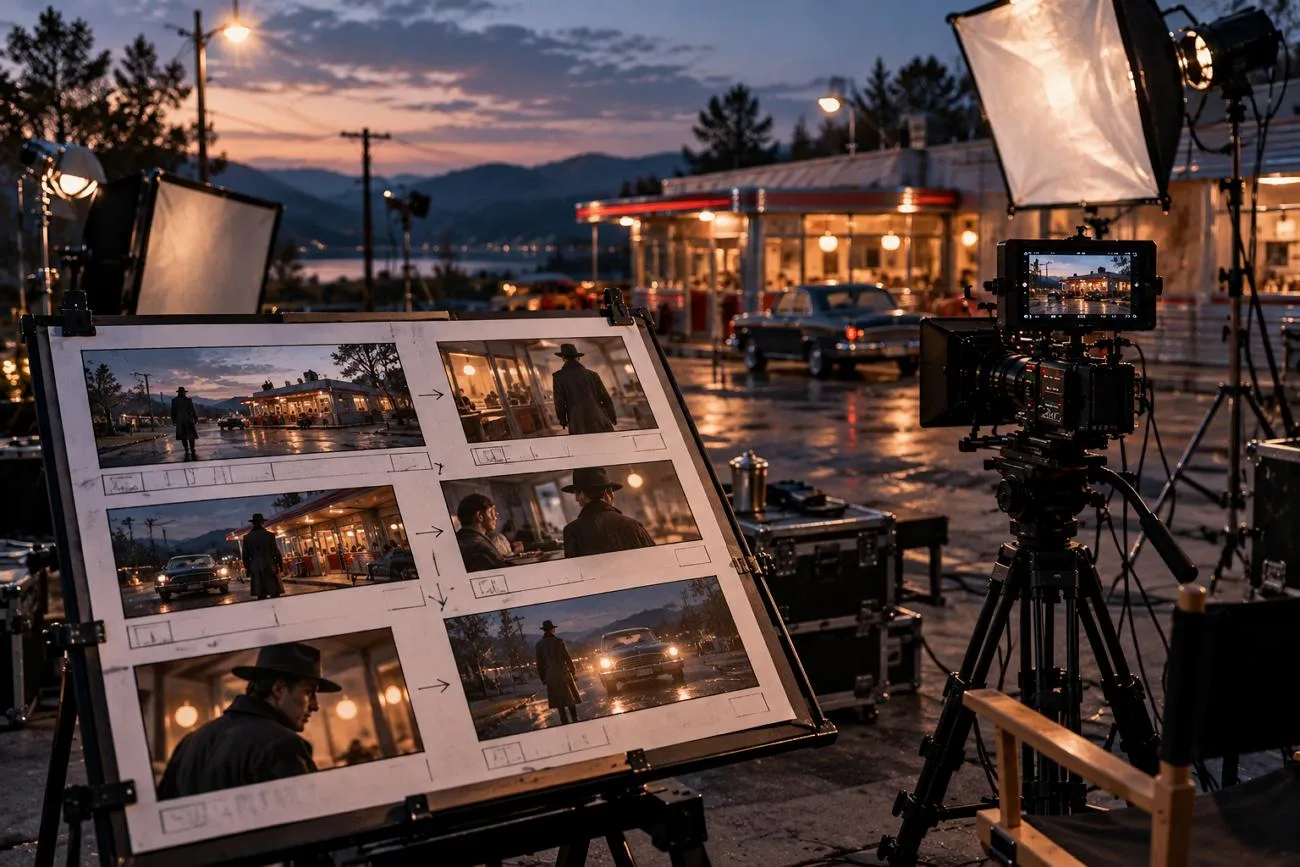
Kling AI can turn short text prompts into cinematic videos with smooth motion and sound. Strong Kling AI prompts help prevent stiff movement, changing faces, and missing scene details. A useful prompt describes the subject, movement, scene, camera, lighting, and visual style carefully.
This structure works well for cinematic scenes, advertisements, anime, dialogue, and creative video projects. You can also use detailed prompts to control movement when turning images into videos. This guide shares practical prompt examples and simple methods for creating better Kling videos.
Part 1. 10 Best Kling AI Prompts for Different Video Styles
A useful Kling AI prompt combines key details to guide each generated video scene. Adding movement, camera, lighting, and atmosphere can make the final video more controlled. The table below explains each important element with a simple example for better understanding:
| Element | What to Describe | Example |
| Subject | Who or what appears, with clothing or material details | A detective in a gray trench coat |
| Movement | One clear action that fits the clip length | Turns up his collar |
| Scene | Place, time of day, and weather | Empty cobblestones in the rain |
| Camera Language | Shot size and one camera move | Slow push-in from medium shot to close-up |
| Lighting | Light source, direction, and color | Cold blue light with warm lamp glow |
| Atmosphere | Mood, genre, or film look | 35mm film grain and tense noir mood |
The best Kling AI prompts use simple language and actions suited for short clips. Newer video controls can also guide dialogue, sound, camera shots, and scene changes. Timing cues help place important actions at specific moments within the generated video. Let's explore 10 useful prompt examples for creating different styles of AI videos.
Cinematic Film Prompts
Cinematic prompts describe the character, action, camera movement, and lighting within each scene. Lens details and film effects can give generated footage a more cinematic appearance. Below are the cinematic prompts you can use for different film scenes:
- Desert Horse Rider: A rider in a dust-covered poncho gallops across red desert dunes at sunset, cloak whipping in the wind. Low-angle tracking shot, golden backlight with a Tyndall effect through the dust, epic western mood.
- Rainy Noir Detective: A detective in a gray trench coat turns up his collar under a flickering streetlamp as rain falls on empty cobblestones. Slow push-in from medium shot to close-up, cold blue light with warm lamp glow, 35mm film grain, tense noir mood.
Commercial and Product Prompts
Product prompts keep the main item sharp while using simple movement throughout each scene. Slower camera movement can make advertisements feel more polished than several fast actions combined. Try these best Kling prompts to create polished product advertisements with controlled visual movement:
- Smartwatch Hero Shot: A matte black smartwatch rotates slowly on a floating glass platform as its screen lights up with a morning alarm. Macro orbit, cool studio rim light, dark gradient background, sleek tech commercial style.
- Skincare Morning Routine: A woman applies a drop of serum to her cheek in a bright bathroom, sunlight catching the glass dropper. Slow push-in, soft natural light, clean white tones, fresh skincare ad feel.
Anime and Animated Prompts
Stylized prompts use clear art styles and simple movement for cleaner animated video scenes. Anime and clay styles can make small motion errors less noticeable in generated footage. See these Kling AI best prompts for creating anime and other animated video styles:
- Anime Train Window: An anime heroine with short black hair gazes out of a train window as rice fields and sunlit hills slide past. Hand-drawn 2D style, soft cel shading, gentle side light, nostalgic summer mood.
- Claymation Fox Chef: A clay-animated fox in a tiny chef’s hat flips a pancake in a cozy cottage kitchen, flour puffing into the air. Stop-motion style, warm lamp light, handmade textures, playful mood.
Dialogue and Multi-Shot Prompts
Dialogue prompts label each speaker and line to keep voices matched with characters properly. Multi-shot prompts organize scenes with separate camera angles, movements, and shot sizes. Let's see how to prompt Kling AI for dialogue and controlled multi-shot video scenes:
- Two-Person Dialogue: In a small bookshop, Mia, a woman in a green sweater, hands a book to Leo and says, “This one changed my life.” Leo, in a denim jacket, grins and replies, “Then I’d better buy two copies.” Medium two-shot, warm afternoon light, soft rain against the window.
- Rooftop Chase: First shot, a wide aerial view of a parkour runner sprinting across rain-slick rooftops at night. Second shot, a side tracking shot as she leaps the gap between two buildings. Third shot, a low-angle close-up as she lands, rolls, and glances back, with sirens and pounding drums.
Image-to-Video and Character Prompts
Image-to-video prompts focus on desired movement instead of describing details already shown onscreen. Start and end frames guide transitions, while Elements help maintain consistent character appearances. These examples show how to write prompts for Kling AI with controlled character movement:
- Day-to-Night Transition: The noon city street in the start frame turns into the night scene from the end frame. Clouds race in time-lapse, shadows sweep across the buildings, and neon signs flicker on, all in a locked-off wide shot.
- Portrait Comes Alive: The woman in the uploaded portrait turns toward the camera, smiles, and tucks her hair behind her ear as a breeze stirs the curtains. Slow push-in and natural window light, with her face and outfit unchanged.
Part 2. How to Convert Your Kling AI Prompts to AI Videos
Good settings help Kling AI prompts produce videos that better match your creative ideas. Below are the main settings that can improve your final AI video results:
- Model Version: VIDEO 3.0 supports dialogue, native sound, chase scenes, and custom multi-shot control smoothly.
- Duration: Clips range from 3 to 15 seconds, with shorter lengths fitting single actions best.
- Resolution: Use 720p when testing different ideas before creating the finished version of videos. Choose 1080p afterward when you want sharper details and better quality for final videos.
- Shot Mode: Multi-Shot creates cuts automatically, while Custom Multi-Shot follows your written shot order precisely.
- Frames: Add a starting frame and optional ending frame to create more controlled transitions smoothly.
Each Kling generation reaches 15 seconds, making longer stories harder to manage across separate clips. MagicLight AI offers 20 video models, including Kling 3.0, for different video creation needs. The same prompts work with Kling 3.0 through MagicLight AI's Image to Video feature.
Character appearance, clothing, lighting, and tone can stay consistent across different connected video scenes. Story to Video divides longer scripts into scenes while adding narration and subtitles automatically. A free plan offers limited credits without requiring a card for the first test.
How to Turn a Kling AI Prompt Into a Video With MagicLight AI
MagicLight AI lets you prompt Kling AI and turn your image into video. Now, follow the steps to create an image-to-video clip using your chosen prompt:
Step 1. Open Image to Video
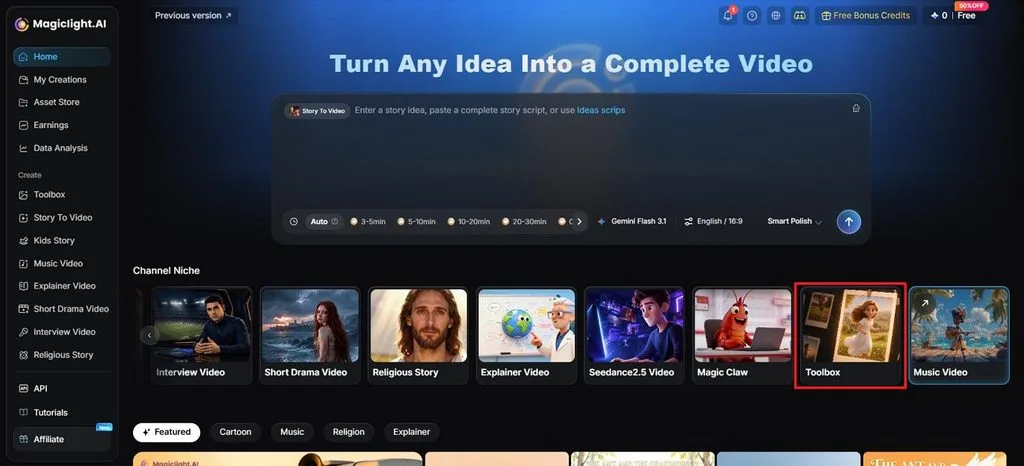
Once you enter MagicLight AI, select Toolbox to open the Image to Video workspace.
Step 2. Upload Your Image and Add the Prompt
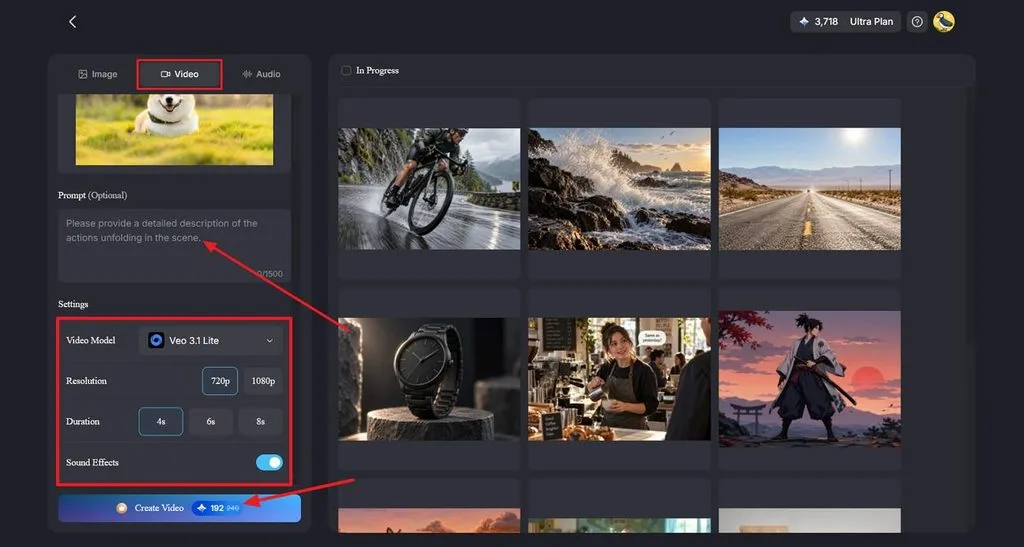
Select the Video tab, then upload or drag your image into the workspace. Paste your Kling AI prompt into the Prompt section and adjust the movement or camera instructions. Choose a video model such as Kling 3.0, then select your preferred Resolution and Duration. Turn on Sound Effects when supported, then click Create Video.
Step 3. Review and Download the Video
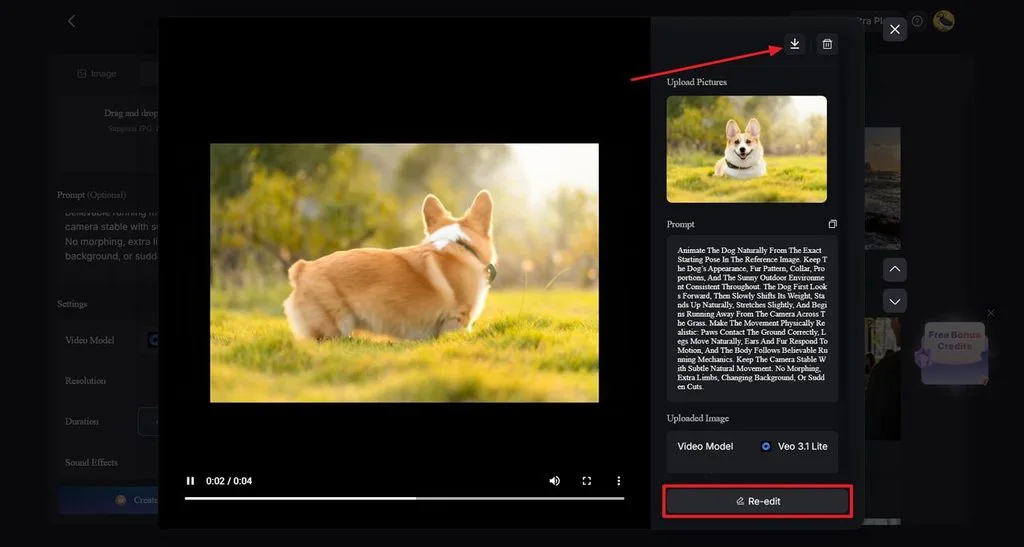
Play the finished video and check whether the movement follows your Kling AI prompt. Select Re-edit if you want to change the prompt, model, or other settings. Once the video looks right, click the Download icon at the top to save it.
Conclusion
Kling AI prompts work better when subject, movement, scene, and camera details stay specific. Clear dialogue, lighting, and mood instructions can help each generated scene follow your intended direction. You can also animate an image by describing movement instead of repeating visible picture details. MagicLight AI supports Kling 3.0 and provides useful tools for building longer connected video stories.
Frequently Asked Questions
- Can Kling AI generate videos from images?
Kling can turn uploaded images into videos while keeping the original frame as a reference. The best Kling AI prompts describe movement and camera direction instead of repeating visible details. You can also provide an ending frame to guide transitions between different visual moments.
- How can I keep characters consistent in Kling AI?
Kling Elements uses reference images or videos to maintain character appearance across different scenes. The “Kling AI best prompts” repeat important clothing, hairstyle, props, and character role details. Keeping these details unchanged gives Kling clearer visual guidance when generating additional character shots.
- What is a good Kling AI alternative for creating story videos?
MagicLight AI can turn written stories into longer videos with connected scenes and characters. Its Story to Video feature can add narration while maintaining characters throughout different scenes. Kling 3.0 is also available, allowing existing prompts to work within the same platform.
![How to Turn Audio File Into Video in 2026 [Full Guide]](https://magiclight.ai/wp-2/wp-content/uploads/audio-to-video-conversion-guide.jpg-300x169.webp)
![How to Make an AI Movie in 2026 [Step-by-Step Guide]](https://magiclight.ai/wp-2/wp-content/uploads/ai-movie-creation-journey-posters.jpg-3-300x169.webp)


![How to Write a Script for a Short Film in 2026 [Beginner’s Guide]](https://magiclight.ai/wp-2/wp-content/uploads/short-film-screenplay-writing-guide-300x169.webp)